> ## Documentation Index
> Fetch the complete documentation index at: https://docs.affinda.com/llms.txt
> Use this file to discover all available pages before exploring further.
# Resume Redactor for unbiased recruitment
> How Affinda's Resume Redactor removes personal and demographic data from resumes to support unbiased recruitment, including the list of redactable fields.
Affinda's Resume Redactor can be used to redact a wide range of data for a range of benefits:
* **Protect against discriminatory biases**: Reduce bias against age, gender, etc.
* **Promote fair candidate selection**: Highlight skills and experience rather than background
* **Foster increased diversity**: Build teams with broader views and perspectives
* **Retain client contact details:** Recruiters can share resumes with their end-customers without sharing names and identifying details
While the Resume Redactor uses similar technology to Affinda's Resume Parser, it is configured differently to ensure that no data is left unredacted.
* Bias towards overpredicting
* Every instance of a particular field or word (e.g. candidate name, location) is redacted
Resume Redactor also works well with Cover Letters
## Exporting the redacted file
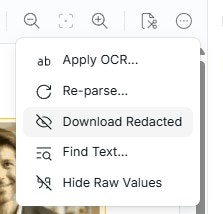
To test the output of the Resume Redactor, users can download directly from the web application by selecting the option under the '...' menu.
 ## Fields redacted
* Candidate Name
* Candidate Phone Number
* Candidate email
* Headshot
* Date Of Birth
* Personal Location
* Gender/Pronouns
* Nationality/Ethnicity
* Marital Status
* Age
* Personal Website
* Education Organisation
* Education Location
* Education Dates
* Education Website
* Work Organisation
* Work Location
* Work Dates
* Work Websites
* Activity Organisation Name
* Activity Location
* Activity Dates
* Activity Website
* Referee Name
* Referee Position
* Referee Organisation Name
* Referee Email
* Referee Phone Number
Any fields that you do not want to be redacted can be disabled in Document Type settings
## Exporting redacted files
Within the Affinda Platform, users will see the predicted values as with other document types. Fields will not yet be redacted. To export a redacted version of the resume, use the [redact document endpoint](https://docs.affinda.com/api-reference/documents/get-redacted-document).
## Fields redacted
* Candidate Name
* Candidate Phone Number
* Candidate email
* Headshot
* Date Of Birth
* Personal Location
* Gender/Pronouns
* Nationality/Ethnicity
* Marital Status
* Age
* Personal Website
* Education Organisation
* Education Location
* Education Dates
* Education Website
* Work Organisation
* Work Location
* Work Dates
* Work Websites
* Activity Organisation Name
* Activity Location
* Activity Dates
* Activity Website
* Referee Name
* Referee Position
* Referee Organisation Name
* Referee Email
* Referee Phone Number
Any fields that you do not want to be redacted can be disabled in Document Type settings
## Exporting redacted files
Within the Affinda Platform, users will see the predicted values as with other document types. Fields will not yet be redacted. To export a redacted version of the resume, use the [redact document endpoint](https://docs.affinda.com/api-reference/documents/get-redacted-document).