This tutorial guides users on how they can achieve full document automation with straight-through processing in Affinda. Stacking validation rules, data mapping, and correctly configuring your validation settings in Affinda allows documents to pass through without the need for human intervention.
This guide is designed for advanced users in Affinda looking to achieve straight-through processing. To complete this guide, users should already have their Document Type(s) configured and hold an Owner or Admin role in Affinda.
Straight-through processing in the context of Affinda refers to a fully automated, end-to-end workflow in which documents that enter the system can be:
Parsed and classified
Key data fields extracted and validated
Enriched or transformed as needed
All without the need for human intervention at any stage.
Straight-through processing allows documents to be automatically processed without manual intervention. This can be achieved in Affinda by using three features together:
Data Mapping: To specify how extracted data should be formatted
Validation Rules: To define what makes a document valid or invalid
Validation Settings: To control how documents are processed based on their validation status
When these features are properly configured, valid documents that meet all rules will automatically pass through to your downstream systems, while documents that fail validation will be flagged for manual review. This ensures accuracy while reducing unnecessary manual checks, helping your organization work more efficiently.
Data mapping is a powerful capability that enhances the accuracy of data extraction. With data mapping configured, the extracted data from a document can be mapped against a list of known options from your knowledge base to validate that it meets expected values. This enables correct values to bypass review, whilst only incorrect values are flagged.
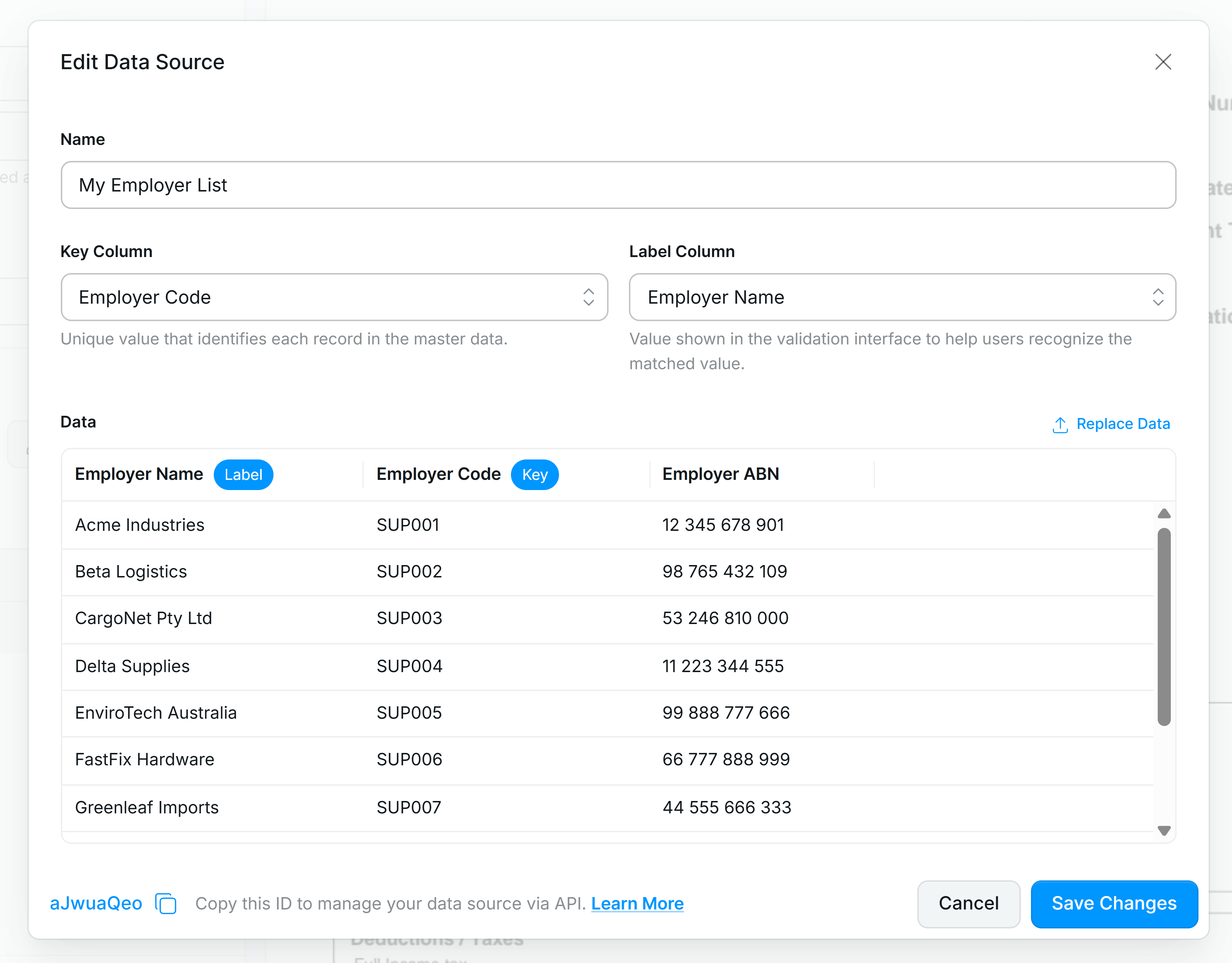
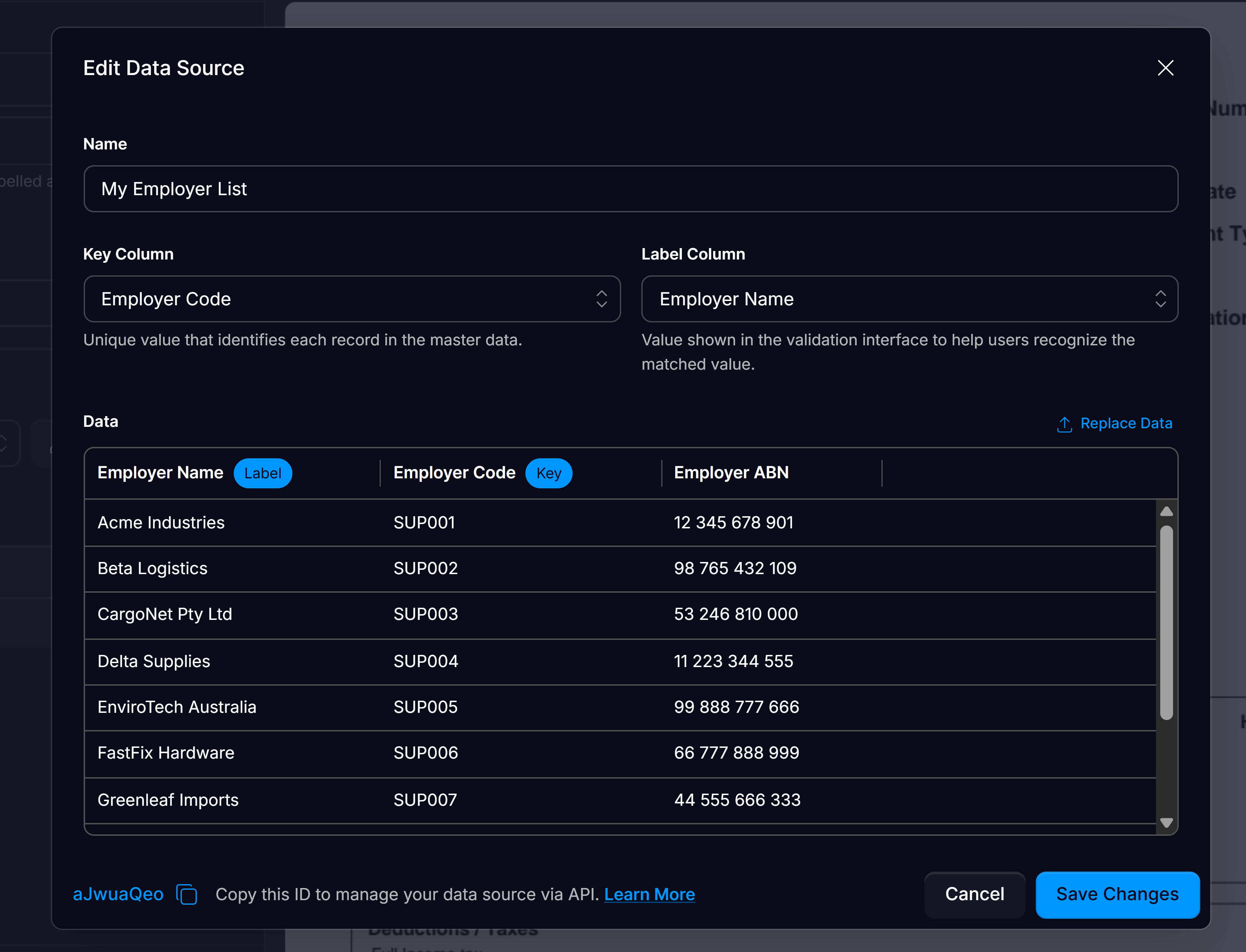
Data Source mapping can be configured through the Affinda app or the API. To configure in the App:
1
Create your Data Source Field
First, start by creating your Data Source field. Navigate to the Configure document type menu, and create a new field with data type “Data Source”.
2
Select existing or add a new Data Source file in Affinda
Data Sources act as lightweight master-data tables that you can manage from within Affinda.Select ”+ New Data Source” and upload your data source file. Affinda supports CSV, XLSX, or JSON files as data sources.Or create via API:
POST /data-sources # Create
3
Select the Key Column
A key column is the single field in your source table whose values are guaranteed to be unique; it is used by Affinda to reliably identify each record unambiguously.
4
Pick the Label Column
The label is the human-readable name stored for each record in a Mapping Data Source; it’s what users will see in the validation UI and drop-downs.
5
Click create Data Source
You can manage your Data Sources at the organizational level.
6
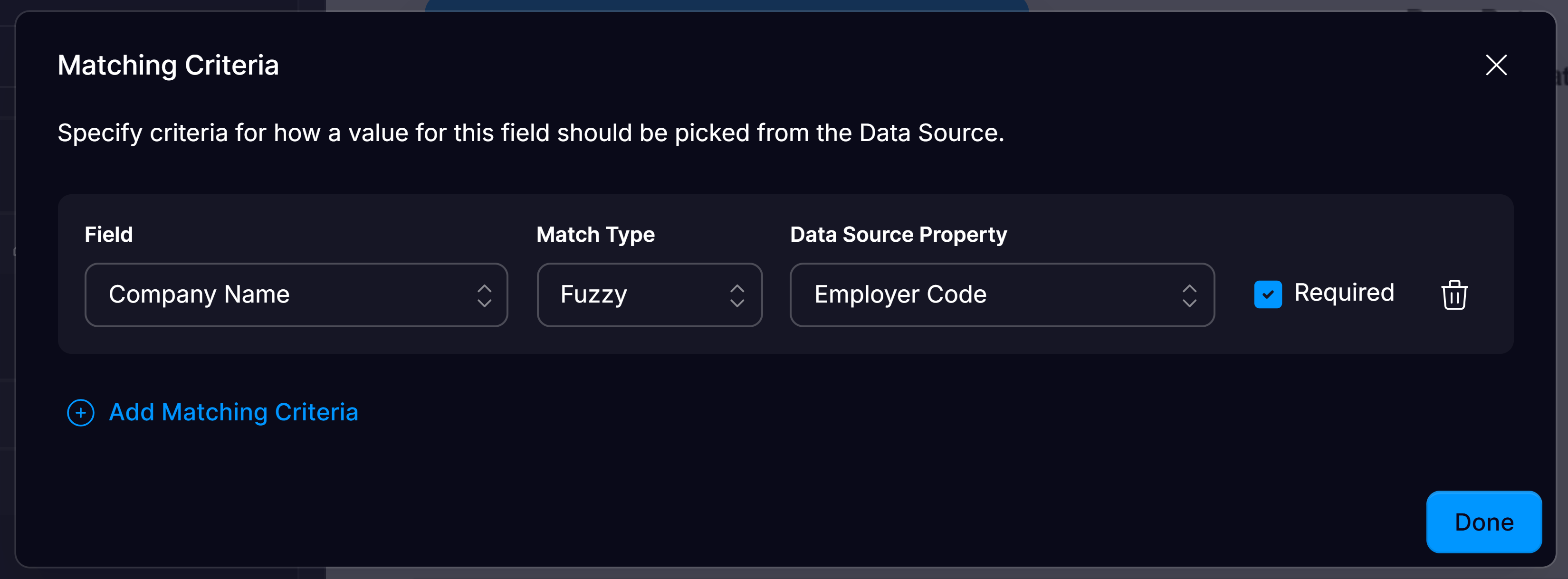
Configure Mapping Criteria
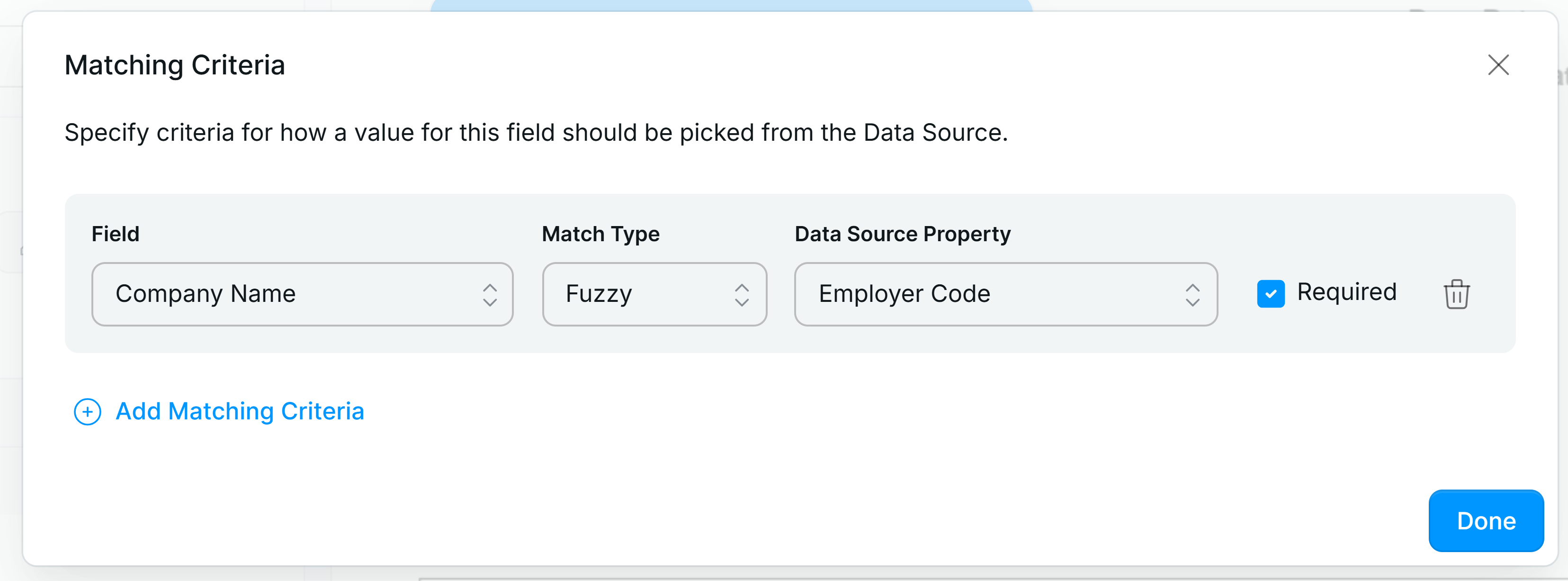
Select the document field to match e.g. Employer Name.Pick the data source property (the column you want to match it to).Select the match type:
Exact - strings must be identical.
Partial - succeeds when the extracted string appears anywhere in the candidate.
Fuzzy - uses edit-distance logic to allow minor typos to still be matched.
7
Tick Required
Tick “Required” if validation should fail when nothing matches for this criterion. Enabling this will flag documents that have failed the matching criteria against your data source, flagging them for review. Documents that have passed the matching criteria won’t be flagged and can continue to your downstream workflows with the confidence that their fields were extracted correctly.
8
Maintain Data Source
Ensure your data source is always up to date to maximise documents that can be STP.You can update data sources manually or automate it with API calls from your integration.Call PUT /data-sources/{id} for full replacement or PATCH /data-sources/{id} for incremental updates.
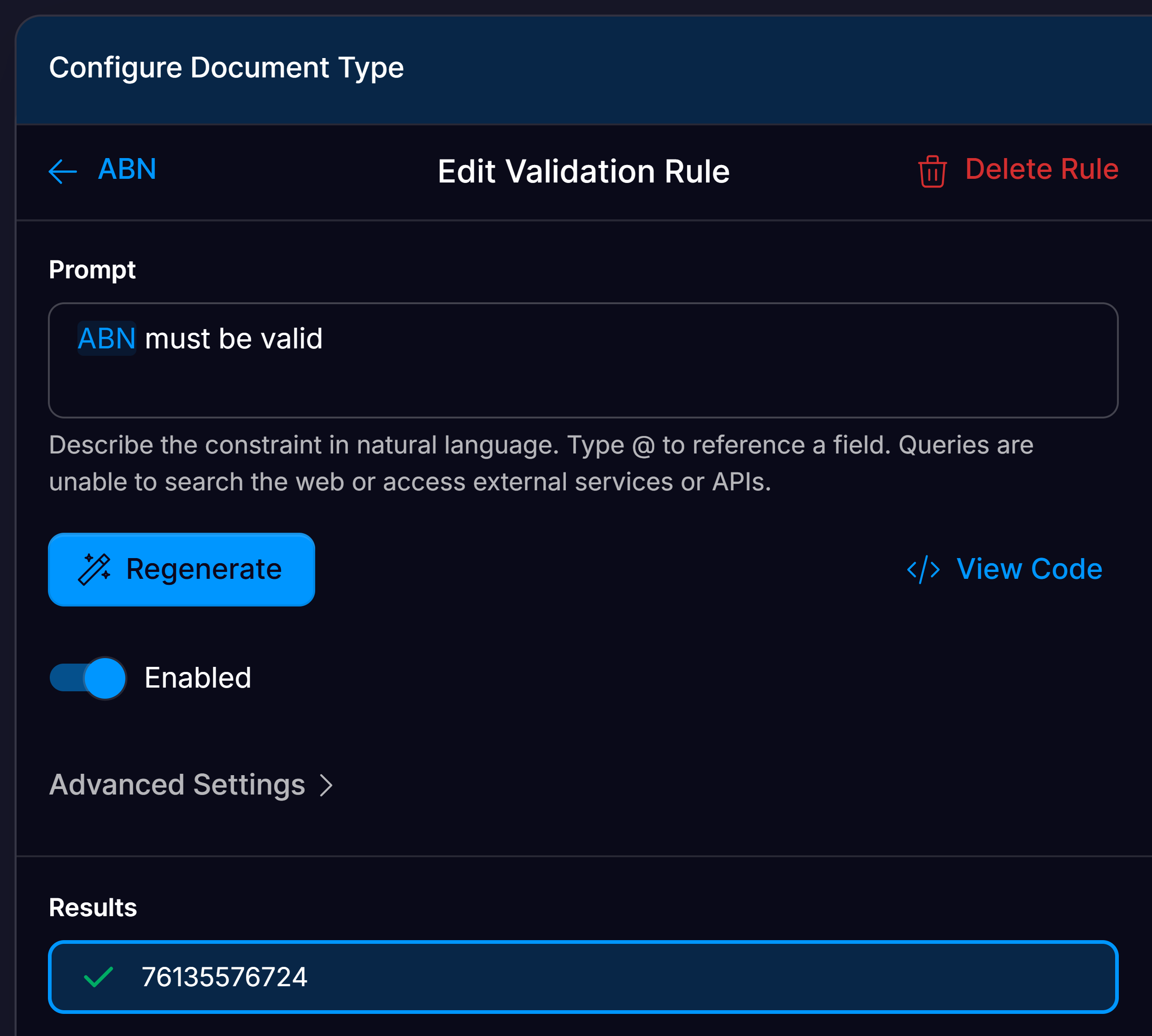
Within Affinda Extract, validation rules can be configured to automatically check whether extracted data meets predefined business logic. When these rules pass, the data is considered valid and does not require user review, enabling straight-through processing for compliant documents. Validation rules help identify documents that fail to meet business rules, prompting review.
1
Open Document Type Configuration Interface
Navigate to the Document Type Configuration interface of the document type that contains the field you want to apply a text transformation to.
2
Edit field or click the Validation tab
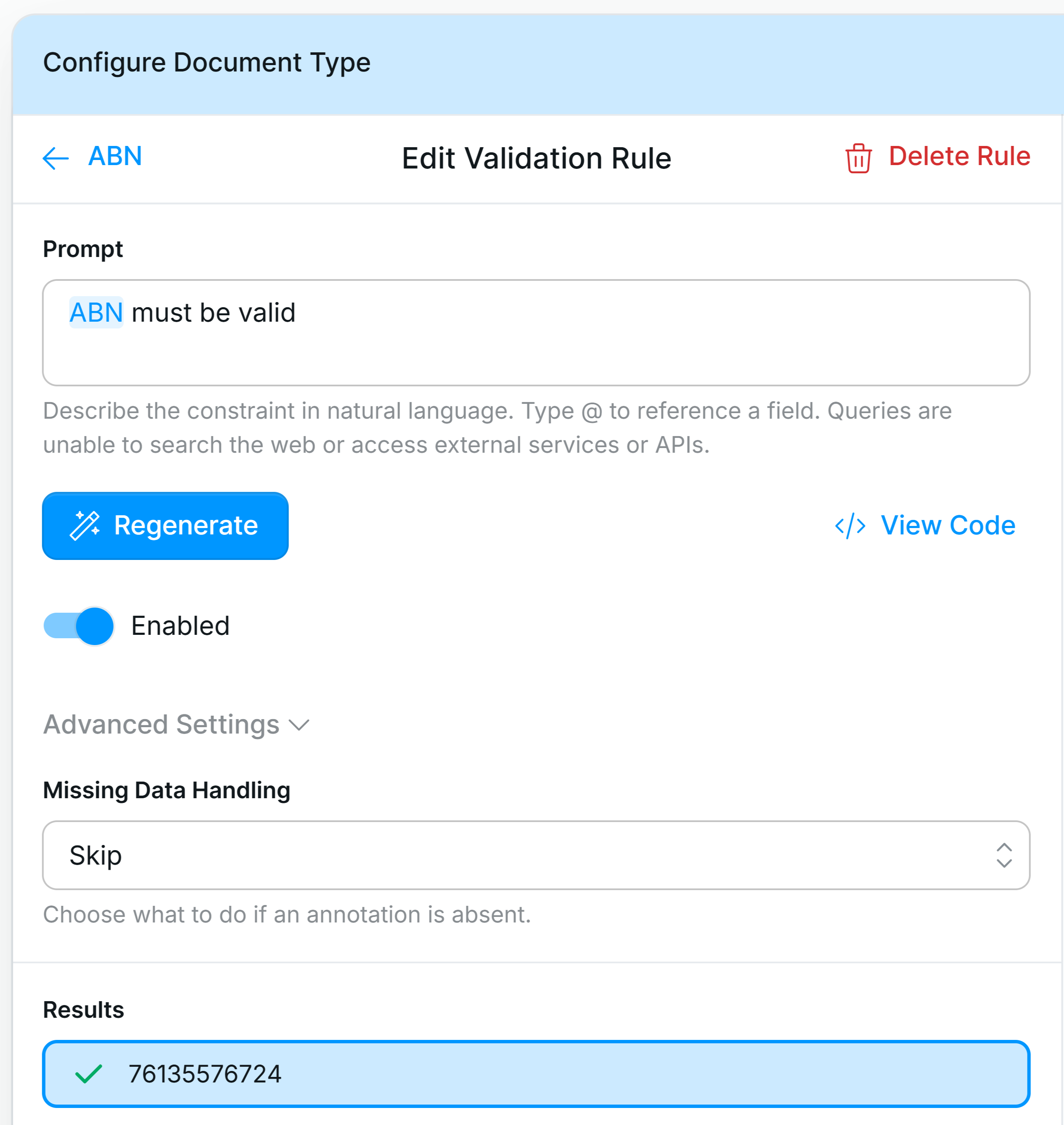
Click the pencil icon next to the field of your choice to open up the Field Settings.Open the “Validation Rule” drop-down.Or go to the validation tab, and click “Add Validation Rule”.
3
Write Validation Rule
Validation rules can be created on just one or multiple extracted fields. Type “@fieldname” to reference a field. Write the rule in natural language and press generate to apply.
Some example validation rules you might use for inspiration are:
“Check @SupplierVAT is a valid VAT”
“Check @CustomerAddress has a valid postcode”
“Check the sum of the @subtotals = @totalamount”
“@purchaseorder is 7 digits long”
You can also include the pass or fail messages you want to be returned in the Validation Interface (e.g. “Ensure the invoice date is before the due date. If not, show: ‘Due date cannot be earlier than invoice date.’”).
4
Assign missing data handling for rule
In the advanced settings of your validation rule, you can configure how the rule should act in the case of missing data.Available Options:
Skip - The rule is skipped entirely—no pass or fail outcome is recorded.
Fail - The rule automatically fails if any required field is missing.
Pass - The rule is marked as passed, regardless of missing fields.
Ignore - The rule runs by treating missing fields as neutral, attempting to return a valid result based on available data.
For example, useful in cases like subtotal + freight + tax = total, where freight is occasionally absent.
5
Check Validation Result
You can see how your document performs against your new validation rule and make changes accordingly.You can also click ‘View Code’ to see the code generated for the rule.It’s best to check your validation rules across different documents to ensure they perform as desired. Test both documents that should pass and fail the rule.
6
Manage validation rules
The easiest way to manage validation rules is in the Validation tab in the Document Type Configuration Interface. There, you can disable fields when needed.
Once you have your data mapping and validation rules configured, the last step to enable straight-through processing is to enable auto-confirmation. This allows Affinda to confirm documents that have passed all data mapping and validation rules, sending them downstream automatically without human review. Documents that fail data mapping or validation rules will be flagged and left for human review.You can enable auto-confirmation in the Validation Settings within your Workflow Settings.
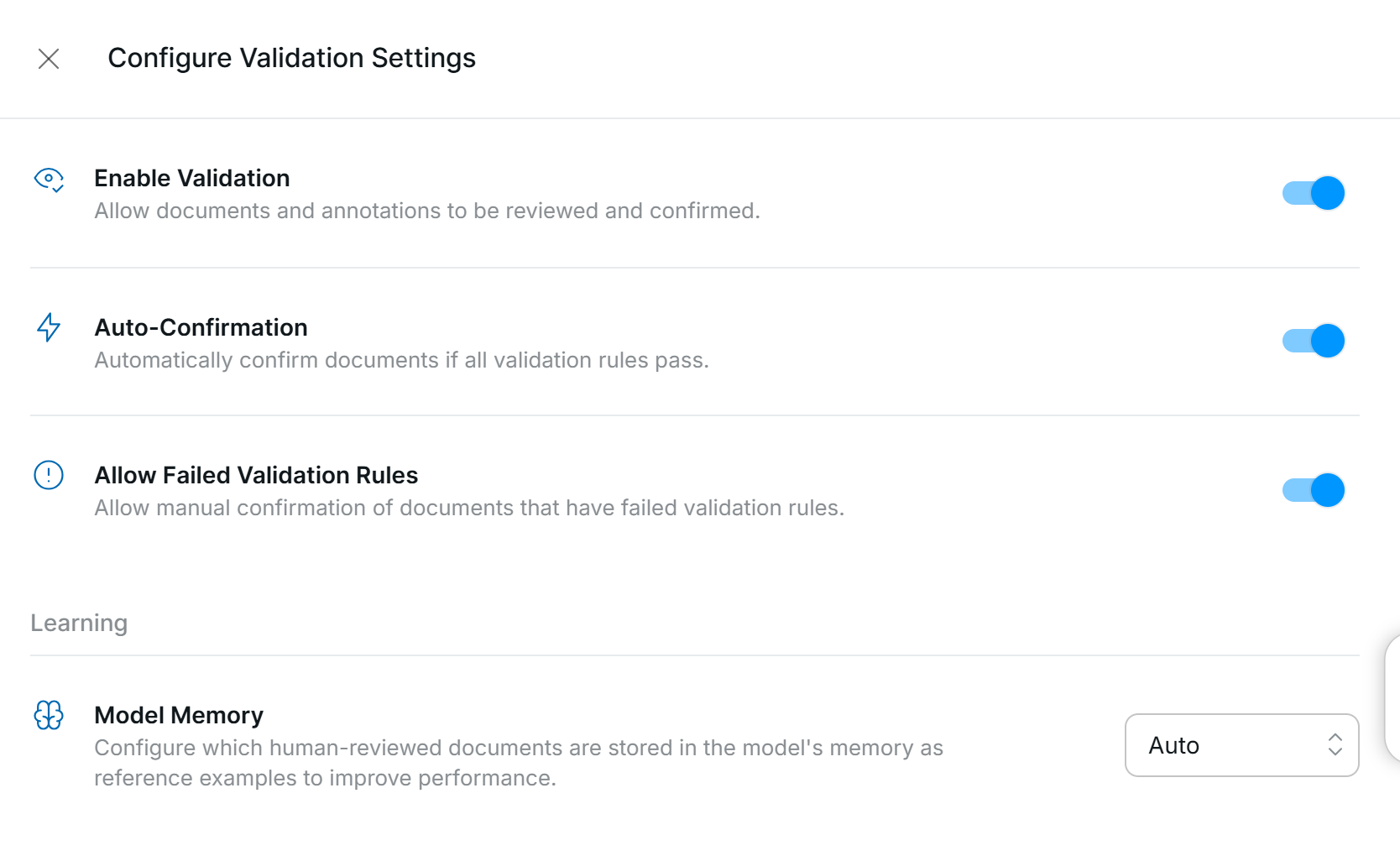
If ‘Auto-Confirmation’ is enabled, a document will skip the ‘For Review’ queue if there are no failed rules on that document (and at least one rule is enabled). It does not require each individual field to be auto-confirmed for the document to be auto-confirmed.
Documents that aren’t correct or don’t pass business rules will need to be reviewed. Affinda’s Document Validation interface offers a user-friendly platform to review and manage these documents. Setting up straight-through processing ensures these documents are flagged for easy review. To learn how to review documents, see our Tutorial: Review Extraction.
{"docsConfig":{"theme":"mint","$schema":"https://mintlify.com/docs.json","name":"Affinda Extract Documentation","description":"Affinda Extract is a document AI platform that turns unstructured documents into structured, validated data through extraction, classification, splitting, and human review. Guides, API reference, and configuration playbooks for building and integrating Affinda models.","colors":{"primary":"#1F3339","light":"#A6FFFB","dark":"#A6FFFB"},"logo":{"light":"https://mintcdn.com/affinda-44/nvZZjc-QOoHXzSQ7/images/affindaextract-inkwell.png?fit=max\u0026auto=format\u0026n=nvZZjc-QOoHXzSQ7\u0026q=85\u0026s=a3e52ff1e274ac5509589a6350b41496","dark":"https://mintcdn.com/affinda-44/lcBcXTOY4DEPcniI/images/affindaextract-greenmist.png?fit=max\u0026auto=format\u0026n=lcBcXTOY4DEPcniI\u0026q=85\u0026s=318f55893ae70c89849919adbbc1a545","href":"https://www.affinda.com/"},"favicon":"https://mintcdn.com/affinda-44/zzz2NA-YwjYcDdgi/Affinda_GreenMist_inkwell_Favicon.png?fit=max\u0026auto=format\u0026n=zzz2NA-YwjYcDdgi\u0026q=85\u0026s=c83f557178ec0b196bef5bafec9b9faf","api":{"playground":{"display":"interactive"},"examples":{"languages":["curl","python","javascript"],"prefill":false}},"appearance":{"default":"system","strict":false},"background":{"decoration":"gradient","color":{"light":"#E8EEED","dark":"#102A2F"}},"navbar":{"links":[{"href":"https://www.affinda.com/pricing-plans","label":"Pricing"},{"href":"https://trust.affinda.com/","label":"Security"},{"href":"https://www.affinda.com/contact","label":"Contact"},{"href":"/support","label":"Support"}],"primary":{"type":"button","label":"Log in","href":"https://app.affinda.com"}},"footer":{"socials":{"linkedin":"https://linkedin.com/company/affinda","youtube":"https://www.youtube.com/@affinda","github":"https://github.com/affinda"}},"seo":{"metatags":{"og:image":"https://cdn.prod.website-files.com/6854ccfd1a7ab92f392b474d/68ae96fe8f3fdbbe0ae04c73_Affinda%20Open%20Graph%20image%20for%20website%20previews.png","og:site_name":"Affinda","twitter:site":"@affinda"}},"fonts":{"heading":{"family":"NeuSans","weight":500,"source":"https://cdn.prod.website-files.com/6854ccfd1a7ab92f392b474d/685b584938c8018fa3d2e9da_NeuSans-Bold.woff2","format":"woff2"},"body":{"family":"NeuSans","weight":400,"source":"https://cdn.prod.website-files.com/6854ccfd1a7ab92f392b474d/685b5849e08b8110997b8e4f_NeuSans-Regular.woff2","format":"woff2"}},"integrations":{"gtm":{"tagId":"GTM-NCW6M2B"}},"banner":{"content":"New to resume parsing? Start with the [Resume Parser console](https://resume-parser.affinda.com/). (Existing resume parsing integrations continue to be supported by Affinda Extract.)","color":{"light":"#B09670","dark":"#102A2F"}},"contextual":{"options":["copy","view","chatgpt","claude"],"display":"header"},"styling":{"latex":false},"navigation":{"pages":[]}},"deployment":{"deploymentMetadataValue":{"subdomain":"affinda-44","hasAudioNarration":false,"actualSubdomain":"affinda-44","customDomains":["docs.affinda.com"],"gitSource":{"type":"github","owner":"affinda","repo":"docs","deployBranch":"main","contentDirectory":"","isPrivate":true,"mountPath":"","label":""},"chroma":{"liveDeploymentHistoryId":"6ae40ac25d9fd79ed6303c6d","collectionId":"9714093e-6f62-4eb7-9373-626f2d68f163","schemaVersion":"v3","latestBuiltDeploymentHistoryId":"6ae40ac25d9fd79ed6303c6d"},"feedback":{"thumbs":true,"agentFeedback":true},"entitlements":{"AI_CHAT":{"status":"ENABLED"},"WEB_MCP":{"status":"ENABLED"},"NARRATION":{"status":"ENABLED"}},"buildId":"6ae40b10dfc193c4660ad2a2","clientVersion":"0.0.4021","searchFilterCounts":[{"language":"default","tag":"API Reference","count":163},{"language":"default","tag":"Endpoints","count":108},{"language":"default","tag":"Deprecated Versions","count":45},{"language":"default","tag":"v2 Endpoints (Legacy)","count":45},{"language":"default","tag":"Configuration Guide","count":26},{"language":"default","tag":"Deprecated End Points","count":25},{"language":"default","tag":"Search \u0026 Match","count":24},{"language":"default","tag":"Extract Handbook","count":13},{"language":"default","tag":"Additional Resources","count":10},{"language":"default","tag":"Data Sources","count":10}]},"assistantConfig":{"enableAskAiButton":true,"enableAskAiSearchBar":true,"deflection":{"enabled":true,"email":"support@affinda.com","showHelpButton":true}},"basePath":"","hasChatPermissions":true,"hasWebMcpPermissions":true,"toggles":[{"name":"kill-isr","enabled":true,"variant":{"name":"disabled","enabled":false,"feature_enabled":true},"impressionData":false},{"name":"agent-mintlify-slack","enabled":true,"variant":{"name":"disabled","enabled":false,"feature_enabled":true},"impressionData":false},{"name":"agent-integrations-settings","enabled":true,"variant":{"name":"disabled","enabled":false,"feature_enabled":true},"impressionData":false},{"name":"automations-pr-grouping","enabled":true,"variant":{"name":"disabled","enabled":false,"feature_enabled":true},"impressionData":false},{"name":"custom-prefix","enabled":true,"variant":{"name":"disabled","enabled":false,"feature_enabled":true},"impressionData":false},{"name":"analytics-v7","enabled":true,"variant":{"name":"disabled","enabled":false,"feature_enabled":true},"impressionData":false},{"name":"user-flows-analytics","enabled":true,"variant":{"name":"disabled","enabled":false,"feature_enabled":true},"impressionData":false},{"name":"no-publish-flow","enabled":true,"variant":{"name":"disabled","enabled":false,"feature_enabled":true},"impressionData":false},{"name":"workos-onboarding","enabled":true,"variant":{"name":"disabled","enabled":false,"feature_enabled":true},"impressionData":false},{"name":"llms-txt-v2","enabled":true,"variant":{"name":"disabled","enabled":false,"feature_enabled":true},"impressionData":false},{"name":"snapshot-serving-live","enabled":true,"variant":{"name":"disabled","enabled":false,"feature_enabled":true},"impressionData":false},{"name":"stripTemperatureMiddleware","enabled":true,"variant":{"name":"disabled","enabled":false,"feature_enabled":true},"impressionData":false},{"name":"support-platform-pylon-zendesk","enabled":true,"variant":{"name":"disabled","enabled":false,"feature_enabled":true},"impressionData":false},{"name":"snapshot-serving","enabled":true,"variant":{"name":"disabled","enabled":false,"feature_enabled":true},"impressionData":false},{"name":"instant-rollback","enabled":true,"variant":{"name":"disabled","enabled":false,"feature_enabled":true},"impressionData":false},{"name":"granular-notifications-server","enabled":true,"variant":{"name":"disabled","enabled":false,"feature_enabled":true},"impressionData":false},{"name":"granular-notifications","enabled":true,"variant":{"name":"disabled","enabled":false,"feature_enabled":true},"impressionData":false},{"name":"automations-fable","enabled":true,"variant":{"name":"disabled","enabled":false,"feature_enabled":true},"impressionData":false},{"name":"fixed-ai-action-pricing","enabled":true,"variant":{"name":"disabled","enabled":false,"feature_enabled":true},"impressionData":false},{"name":"automation-resolve-merge-conflict","enabled":true,"variant":{"name":"disabled","enabled":false,"feature_enabled":true},"impressionData":false},{"name":"scoped-publishing","enabled":true,"variant":{"name":"disabled","enabled":false,"feature_enabled":true},"impressionData":false},{"name":"mintql","enabled":true,"variant":{"name":"disabled","enabled":false,"feature_enabled":true},"impressionData":false},{"name":"page-level-analytics","enabled":true,"variant":{"name":"disabled","enabled":false,"feature_enabled":true},"impressionData":false},{"name":"editor-version-history-v2","enabled":true,"variant":{"name":"disabled","enabled":false,"feature_enabled":true},"impressionData":false},{"name":"billing-page-v2","enabled":true,"variant":{"name":"disabled","enabled":false,"feature_enabled":true},"impressionData":false},{"name":"workspace-projects","enabled":true,"variant":{"name":"disabled","enabled":false,"feature_enabled":true},"impressionData":false},{"name":"assistant-v5","enabled":true,"variant":{"name":"disabled","enabled":false,"feature_enabled":true},"impressionData":false},{"name":"byok-sep-25","enabled":true,"variant":{"name":"disabled","enabled":false,"feature_enabled":true},"impressionData":false},{"name":"fork-pr-previews","enabled":true,"variant":{"name":"disabled","enabled":false,"feature_enabled":true},"impressionData":false},{"name":"revalidation-jwt","enabled":true,"variant":{"name":"disabled","enabled":false,"feature_enabled":true},"impressionData":false},{"name":"vite-origin","enabled":true,"variant":{"name":"disabled","enabled":false,"feature_enabled":true},"impressionData":false},{"name":"billing-updated-9-15","enabled":true,"variant":{"name":"disabled","enabled":false,"feature_enabled":true},"impressionData":false},{"name":"workos-sso-scim","enabled":true,"variant":{"name":"disabled","enabled":false,"feature_enabled":true},"impressionData":false},{"name":"hobby-abuse-scan","enabled":true,"variant":{"name":"disabled","enabled":false,"feature_enabled":true},"impressionData":false},{"name":"dashboard-inbox","enabled":true,"variant":{"name":"disabled","enabled":false,"feature_enabled":true},"impressionData":false},{"name":"workos-signup","enabled":true,"variant":{"name":"disabled","enabled":false,"feature_enabled":true},"impressionData":false},{"name":"workos-enabled","enabled":true,"variant":{"name":"disabled","enabled":false,"feature_enabled":true},"impressionData":false}],"privacy":{"consentBanner":{"enabled":true}},"googleFontsInlined":false},"customCss":[{"filePath":"style.css","content":"html.dark{--tw-prose-body:#FFF9F0;--tw-prose-headings:#FFFFFF;--tw-prose-bullets:#FFFFFF}html.dark .mdx-content{color:#fff9f0}#navbar a[href*=\"app.affinda.com\"],#navbar a[href*=\"app.affinda.com\"] *,#navbar-primary-cta,#navbar-primary-cta *,a[href=\"https://app.affinda.com\"],a[href=\"https://app.affinda.com\"] *,span.text-white.z-10{color:#000!important}"}],"page":{"pagePath":"handbook/straight-through-processing","slug":"/handbook/straight-through-processing","pageMetadata":{"title":"Achieving straight-through processing","description":"Configure machine validation, confidence thresholds, and automation rules to achieve straight-through processing for high-volume document workflows.","sidebarTitle":"Achieve Straight Through Processing","href":"/handbook/straight-through-processing"},"description":{"compiledSource":"\"use strict\";\nconst {jsx: _jsx} = arguments[0];\nconst {useMDXComponents: _provideComponents} = arguments[0];\nfunction _createMdxContent(props) {\n const _components = {\n p: \"p\",\n ..._provideComponents(),\n ...props.components\n };\n return _jsx(_components.p, {\n children: \"Configure machine validation, confidence thresholds, and automation rules to achieve straight-through processing for high-volume document workflows.\"\n });\n}\nfunction MDXContent(props = {}) {\n const {wrapper: MDXLayout} = {\n ..._provideComponents(),\n ...props.components\n };\n return MDXLayout ? _jsx(MDXLayout, {\n ...props,\n children: _jsx(_createMdxContent, {\n ...props\n })\n }) : _createMdxContent(props);\n}\nreturn {\n default: MDXContent\n};\n","frontmatter":{},"scope":{}},"pageType":"default","mdx":{"mdxSource":{"compiledSource":"\"use strict\";const{Fragment:_Fragment,jsx:_jsx,jsxs:_jsxs}=arguments[0];const{useMDXComponents:_provideComponents}=arguments[0];function _createMdxContent(props){const _components={a:`a`,code:`code`,em:`em`,li:`li`,ol:`ol`,p:`p`,pre:`pre`,span:`span`,strong:`strong`,ul:`ul`,..._provideComponents(),...props.components},{Card,CodeBlock,Heading,Info,Note,OptimizedImage,Step,Steps,Tip,Warning}=_components;if(!Card)_missingMdxReference(`Card`,true);if(!CodeBlock)_missingMdxReference(`CodeBlock`,true);if(!Heading)_missingMdxReference(`Heading`,true);if(!Info)_missingMdxReference(`Info`,true);if(!Note)_missingMdxReference(`Note`,true);if(!OptimizedImage)_missingMdxReference(`OptimizedImage`,true);if(!Step)_missingMdxReference(`Step`,true);if(!Steps)_missingMdxReference(`Steps`,true);if(!Tip)_missingMdxReference(`Tip`,true);if(!Warning)_missingMdxReference(`Warning`,true);return _jsxs(_Fragment,{children:[_jsx(Heading,{level:`2`,id:`purpose`,children:`Purpose`}),`\n`,_jsx(_components.p,{children:`This tutorial guides users on how they can achieve full document automation with straight-through processing in Affinda. Stacking validation rules, data mapping, and correctly configuring your validation settings in Affinda allows documents to pass through without the need for human intervention.`}),`\n`,_jsx(Info,{children:_jsx(_components.p,{children:`This guide is designed for advanced users in Affinda looking to achieve straight-through processing. To complete this guide, users should already have their Document Type(s) configured and hold an Owner or Admin role in Affinda.`})}),`\n`,_jsx(Heading,{level:`2`,id:`what-is-straight-through-processing`,children:`What is straight-through processing?`}),`\n`,_jsx(_components.p,{children:`Straight-through processing in the context of Affinda refers to a fully automated, end-to-end workflow in which documents that enter the system can be:`}),`\n`,_jsxs(_components.ul,{children:[`\n`,_jsx(_components.li,{children:`Parsed and classified`}),`\n`,_jsx(_components.li,{children:`Key data fields extracted and validated`}),`\n`,_jsx(_components.li,{children:`Enriched or transformed as needed\nAll without the need for human intervention at any stage.`}),`\n`]}),`\n`,_jsx(Heading,{level:`2`,id:`straight-through-processing-in-affinda`,children:`Straight-through processing in Affinda`}),`\n`,_jsx(_components.p,{children:`Straight-through processing allows documents to be automatically processed without manual intervention. This can be achieved in Affinda by using three features together:`}),`\n`,_jsxs(_components.ol,{children:[`\n`,_jsxs(_components.li,{children:[_jsx(_components.strong,{children:`Data Mapping:`}),` To specify how extracted data should be formatted`]}),`\n`,_jsxs(_components.li,{children:[_jsx(_components.strong,{children:`Validation Rules:`}),` To define what makes a document valid or invalid`]}),`\n`,_jsxs(_components.li,{children:[_jsx(_components.strong,{children:`Validation Settings:`}),` To control how documents are processed based on their validation status`]}),`\n`]}),`\n`,_jsx(_components.p,{children:`When these features are properly configured, valid documents that meet all rules will automatically pass through to your downstream systems, while documents that fail validation will be flagged for manual review. This ensures accuracy while reducing unnecessary manual checks, helping your organization work more efficiently.`}),`\n`,_jsx(Heading,{level:`2`,id:`data-mapping`,children:`Data Mapping`}),`\n`,_jsx(Card,{title:`What is Data Mapping?`,children:_jsx(_components.p,{children:`Data mapping is a powerful capability that enhances the accuracy of data extraction. With data mapping configured, the extracted data from a document can be mapped against a list of known options from your knowledge base to validate that it meets expected values. This enables correct values to bypass review, whilst only incorrect values are flagged.`})}),`\n`,_jsx(_components.p,{children:`Data Source mapping can be configured through the Affinda app or the API. To configure in the App:`}),`\n`,_jsx(OptimizedImage,{className:`mint-block mint-border-2 mint-border-gray-300 mint-rounded-lg dark:mint-hidden`,alt:`Edit Data Source dialog`,src:`https://mintcdn.com/affinda-44/X0_dfJGu-kAY4WOy/images/datasource-light.png?fit=max\u0026auto=format\u0026n=X0_dfJGu-kAY4WOy\u0026q=85\u0026s=97e3b9c1887fd90cee2861c92c47b142`,\"data-og-width\":`3383`,width:`3383`,\"data-og-height\":`2645`,height:`2645`,\"data-path\":`images/datasource-light.png`,\"data-optimize\":`true`,\"data-opv\":`3`,srcset:`https://mintcdn.com/affinda-44/X0_dfJGu-kAY4WOy/images/datasource-light.png?w=280\u0026fit=max\u0026auto=format\u0026n=X0_dfJGu-kAY4WOy\u0026q=85\u0026s=ec896c90d27a56216df1e0955508cd69 280w, https://mintcdn.com/affinda-44/X0_dfJGu-kAY4WOy/images/datasource-light.png?w=560\u0026fit=max\u0026auto=format\u0026n=X0_dfJGu-kAY4WOy\u0026q=85\u0026s=54b90b36ed5b02ae7cf435107f400097 560w, https://mintcdn.com/affinda-44/X0_dfJGu-kAY4WOy/images/datasource-light.png?w=840\u0026fit=max\u0026auto=format\u0026n=X0_dfJGu-kAY4WOy\u0026q=85\u0026s=b30fdd6e4d43a1fa39e2adcd9f7ac789 840w, https://mintcdn.com/affinda-44/X0_dfJGu-kAY4WOy/images/datasource-light.png?w=1100\u0026fit=max\u0026auto=format\u0026n=X0_dfJGu-kAY4WOy\u0026q=85\u0026s=7cda1a4a7b83f763a56fe02247308053 1100w, https://mintcdn.com/affinda-44/X0_dfJGu-kAY4WOy/images/datasource-light.png?w=1650\u0026fit=max\u0026auto=format\u0026n=X0_dfJGu-kAY4WOy\u0026q=85\u0026s=54873a719434bbed167bdf63a59327b3 1650w, https://mintcdn.com/affinda-44/X0_dfJGu-kAY4WOy/images/datasource-light.png?w=2500\u0026fit=max\u0026auto=format\u0026n=X0_dfJGu-kAY4WOy\u0026q=85\u0026s=30307f6e711783744a5088e8f704d231 2500w`}),`\n`,_jsx(OptimizedImage,{className:`mint-border-2 mint-border-gray-300 mint-rounded-lg mint-hidden dark:mint-block`,alt:`Edit Data Source dialog`,src:`https://mintcdn.com/affinda-44/X0_dfJGu-kAY4WOy/images/datasource-dark.png?fit=max\u0026auto=format\u0026n=X0_dfJGu-kAY4WOy\u0026q=85\u0026s=07dc33665b6983eb571c9cd43e39655c`,\"data-og-width\":`3486`,width:`3486`,\"data-og-height\":`2663`,height:`2663`,\"data-path\":`images/datasource-dark.png`,\"data-optimize\":`true`,\"data-opv\":`3`,srcset:`https://mintcdn.com/affinda-44/X0_dfJGu-kAY4WOy/images/datasource-dark.png?w=280\u0026fit=max\u0026auto=format\u0026n=X0_dfJGu-kAY4WOy\u0026q=85\u0026s=e8a57ee6c2188131e938abc10395f768 280w, https://mintcdn.com/affinda-44/X0_dfJGu-kAY4WOy/images/datasource-dark.png?w=560\u0026fit=max\u0026auto=format\u0026n=X0_dfJGu-kAY4WOy\u0026q=85\u0026s=c77bfd83f4acab347b38d1c3c5976406 560w, https://mintcdn.com/affinda-44/X0_dfJGu-kAY4WOy/images/datasource-dark.png?w=840\u0026fit=max\u0026auto=format\u0026n=X0_dfJGu-kAY4WOy\u0026q=85\u0026s=2a7786ddf1edf60f0679c2d9c57d6a08 840w, https://mintcdn.com/affinda-44/X0_dfJGu-kAY4WOy/images/datasource-dark.png?w=1100\u0026fit=max\u0026auto=format\u0026n=X0_dfJGu-kAY4WOy\u0026q=85\u0026s=7934cf654898df2d2a986c27b2d35558 1100w, https://mintcdn.com/affinda-44/X0_dfJGu-kAY4WOy/images/datasource-dark.png?w=1650\u0026fit=max\u0026auto=format\u0026n=X0_dfJGu-kAY4WOy\u0026q=85\u0026s=d568539043c0d2fbf52810fbe5c60762 1650w, https://mintcdn.com/affinda-44/X0_dfJGu-kAY4WOy/images/datasource-dark.png?w=2500\u0026fit=max\u0026auto=format\u0026n=X0_dfJGu-kAY4WOy\u0026q=85\u0026s=ad6431ad095e32f6057e860ca34ded23 2500w`}),`\n`,_jsxs(Steps,{children:[_jsx(Step,{title:`Create your Data Source Field`,children:_jsx(_components.p,{children:`First, start by creating your Data Source field. Navigate to the Configure document type menu, and create a new field with data type “Data Source”.`})}),_jsxs(Step,{title:`Select existing or add a new Data Source file in Affinda`,children:[_jsxs(_components.p,{children:[`Data Sources act as `,_jsx(_components.strong,{children:`lightweight master-data tables`}),` that you can manage from within Affinda.`]}),_jsx(_components.p,{children:`Select ”+ New Data Source” and upload your data source file. Affinda supports CSV, XLSX, or JSON files as data sources.`}),_jsxs(_components.p,{children:[`Or create via `,_jsx(_components.strong,{children:`API`}),`:`]}),_jsx(CodeBlock,{filename:``,numberOfLines:`1`,language:`http`,children:_jsx(_components.pre,{className:`shiki shiki-themes github-light-default dark-plus`,style:{backgroundColor:`#ffffff`,\"--shiki-dark-bg\":`#0B0C0E`,color:`#1f2328`,\"--shiki-dark\":`#D4D4D4`},language:`http`,children:_jsxs(_components.code,{language:`http`,numberOfLines:`1`,children:[_jsxs(_components.span,{className:`line`,children:[_jsx(_components.span,{style:{color:`#CF222E`,\"--shiki-dark\":`#C586C0`},children:`POST`}),_jsx(_components.span,{style:{color:`#1F2328`,\"--shiki-dark\":`#D4D4D4`},children:` /data-sources # Create`})]}),`\n`]})})})]}),_jsx(Step,{title:`Select the Key Column`,children:_jsxs(_components.p,{children:[`A `,_jsx(_components.em,{children:`key column`}),` is the single field in your source table whose values are guaranteed to be unique; it is used by Affinda to reliably identify each record unambiguously.`]})}),_jsx(Step,{title:`Pick the Label Column`,children:_jsxs(_components.p,{children:[`The `,_jsx(_components.em,{children:`label`}),` is the human-readable name stored for each record in a Mapping Data Source; it’s what users will see in the validation UI and drop-downs.`]})}),_jsx(Step,{title:`Click create Data Source`,children:_jsx(_components.p,{children:`You can manage your Data Sources at the organizational level.`})}),_jsxs(Step,{title:`Configure Mapping Criteria`,children:[_jsx(OptimizedImage,{className:`mint-block mint-border-2 mint-border-gray-300 mint-rounded-lg dark:mint-hidden`,alt:`Matching Criteria dialog`,style:{width:`72%`},src:`https://mintcdn.com/affinda-44/8O48gu_z8QeuNsDM/images/mapping-light.png?fit=max\u0026auto=format\u0026n=8O48gu_z8QeuNsDM\u0026q=85\u0026s=8cd8e7ff9309b631070379df3094f282`,\"data-og-width\":`3311`,width:`3311`,\"data-og-height\":`1226`,height:`1226`,\"data-path\":`images/mapping-light.png`,\"data-optimize\":`true`,\"data-opv\":`3`,srcset:`https://mintcdn.com/affinda-44/8O48gu_z8QeuNsDM/images/mapping-light.png?w=280\u0026fit=max\u0026auto=format\u0026n=8O48gu_z8QeuNsDM\u0026q=85\u0026s=1ce016fc42050adcdb76afcad449e176 280w, https://mintcdn.com/affinda-44/8O48gu_z8QeuNsDM/images/mapping-light.png?w=560\u0026fit=max\u0026auto=format\u0026n=8O48gu_z8QeuNsDM\u0026q=85\u0026s=f4ea91c83de69ecfe2fda12a7aca5a83 560w, https://mintcdn.com/affinda-44/8O48gu_z8QeuNsDM/images/mapping-light.png?w=840\u0026fit=max\u0026auto=format\u0026n=8O48gu_z8QeuNsDM\u0026q=85\u0026s=dc806eebaa72116a210c5a9d86d378d9 840w, https://mintcdn.com/affinda-44/8O48gu_z8QeuNsDM/images/mapping-light.png?w=1100\u0026fit=max\u0026auto=format\u0026n=8O48gu_z8QeuNsDM\u0026q=85\u0026s=4bf3bd1bfb0445a1fcb3549d04c799c8 1100w, https://mintcdn.com/affinda-44/8O48gu_z8QeuNsDM/images/mapping-light.png?w=1650\u0026fit=max\u0026auto=format\u0026n=8O48gu_z8QeuNsDM\u0026q=85\u0026s=0292576d259b167da220c9847e4b5482 1650w, https://mintcdn.com/affinda-44/8O48gu_z8QeuNsDM/images/mapping-light.png?w=2500\u0026fit=max\u0026auto=format\u0026n=8O48gu_z8QeuNsDM\u0026q=85\u0026s=7aabe62bcd42e1d0a91370bb2496ef5a 2500w`}),_jsx(OptimizedImage,{className:`mint-border-2 mint-border-gray-300 mint-rounded-lg mint-hidden dark:mint-block`,alt:`Matching Criteria dialog`,style:{width:`72%`},src:`https://mintcdn.com/affinda-44/8O48gu_z8QeuNsDM/images/mapping-dark.png?fit=max\u0026auto=format\u0026n=8O48gu_z8QeuNsDM\u0026q=85\u0026s=d85af92a0642a62a7c92f230cb68fdef`,\"data-og-width\":`3300`,width:`3300`,\"data-og-height\":`1219`,height:`1219`,\"data-path\":`images/mapping-dark.png`,\"data-optimize\":`true`,\"data-opv\":`3`,srcset:`https://mintcdn.com/affinda-44/8O48gu_z8QeuNsDM/images/mapping-dark.png?w=280\u0026fit=max\u0026auto=format\u0026n=8O48gu_z8QeuNsDM\u0026q=85\u0026s=093fa07b1f79c25c55b496554765db73 280w, https://mintcdn.com/affinda-44/8O48gu_z8QeuNsDM/images/mapping-dark.png?w=560\u0026fit=max\u0026auto=format\u0026n=8O48gu_z8QeuNsDM\u0026q=85\u0026s=b18f25562fe713f1bb983f803ca2f82f 560w, https://mintcdn.com/affinda-44/8O48gu_z8QeuNsDM/images/mapping-dark.png?w=840\u0026fit=max\u0026auto=format\u0026n=8O48gu_z8QeuNsDM\u0026q=85\u0026s=c56449bdf055232b0c3bf9a7a398bbd0 840w, https://mintcdn.com/affinda-44/8O48gu_z8QeuNsDM/images/mapping-dark.png?w=1100\u0026fit=max\u0026auto=format\u0026n=8O48gu_z8QeuNsDM\u0026q=85\u0026s=f03c286a6c5c1556690ef4b4206d9d29 1100w, https://mintcdn.com/affinda-44/8O48gu_z8QeuNsDM/images/mapping-dark.png?w=1650\u0026fit=max\u0026auto=format\u0026n=8O48gu_z8QeuNsDM\u0026q=85\u0026s=e8963c42cffd238a55a76ea2768d20e0 1650w, https://mintcdn.com/affinda-44/8O48gu_z8QeuNsDM/images/mapping-dark.png?w=2500\u0026fit=max\u0026auto=format\u0026n=8O48gu_z8QeuNsDM\u0026q=85\u0026s=10bfa39ab4e23f6a34852ee4556a9b17 2500w`}),_jsx(_components.p,{children:`Select the document field to match e.g. Employer Name.`}),_jsx(_components.p,{children:`Pick the data source property (the column you want to match it to).`}),_jsx(_components.p,{children:`Select the match type:`}),_jsxs(_components.ul,{children:[`\n`,_jsx(_components.li,{children:`Exact - strings must be identical.`}),`\n`,_jsx(_components.li,{children:`Partial - succeeds when the extracted string appears anywhere in the candidate.`}),`\n`,_jsx(_components.li,{children:`Fuzzy - uses edit-distance logic to allow minor typos to still be matched.`}),`\n`]})]}),_jsx(Step,{title:`Tick Required`,children:_jsx(_components.p,{children:`Tick “Required” if validation should fail when nothing matches for this criterion. Enabling this will flag documents that have failed the matching criteria against your data source, flagging them for review. Documents that have passed the matching criteria won’t be flagged and can continue to your downstream workflows with the confidence that their fields were extracted correctly.`})}),_jsxs(Step,{title:`Maintain Data Source`,children:[_jsx(_components.p,{children:`Ensure your data source is always up to date to maximise documents that can be STP.`}),_jsx(_components.p,{children:`You can update data sources manually or automate it with API calls from your integration.`}),_jsxs(_components.p,{children:[`Call `,_jsx(_components.code,{children:`PUT /data-sources/{id}`}),` for full replacement or `,_jsx(_components.code,{children:`PATCH /data-sources/{id}`}),` for incremental updates.`]})]})]}),`\n`,_jsxs(Tip,{children:[_jsx(Heading,{level:`3`,id:`tips-for-reliable-matching`,children:`Tips for reliable matching`}),_jsxs(_components.ul,{children:[`\n`,_jsx(_components.li,{children:`Trim whitespace and normalise case in your source files.`}),`\n`,_jsx(_components.li,{children:`Ensure the key column is unique.`}),`\n`,_jsx(_components.li,{children:`Keep label strings short so they fit comfortably in the UI.`}),`\n`]})]}),`\n`,_jsx(Heading,{level:`2`,id:`validation-rules`,children:`Validation rules`}),`\n`,_jsx(Card,{title:`What are Validation Rules?`,children:_jsx(_components.p,{children:`Within Affinda Extract, validation rules can be configured to automatically check whether extracted data meets predefined business logic. When these rules pass, the data is considered valid and does not require user review, enabling straight-through processing for compliant documents. Validation rules help identify documents that fail to meet business rules, prompting review.`})}),`\n`,_jsx(OptimizedImage,{className:`mint-block mint-border-4 mint-border-gray-300 mint-rounded-lg dark:mint-hidden`,alt:`Validation Rule Configuration`,style:{width:`55%`},src:`https://mintcdn.com/affinda-44/MRSqPveAb_A2ktlh/images/validationfieldlight.png?fit=max\u0026auto=format\u0026n=MRSqPveAb_A2ktlh\u0026q=85\u0026s=dec7e59f139749d1210478c075cf3f38`,\"data-og-width\":`2501`,width:`2501`,\"data-og-height\":`2644`,height:`2644`,\"data-path\":`images/validationfieldlight.png`,\"data-optimize\":`true`,\"data-opv\":`3`,srcset:`https://mintcdn.com/affinda-44/MRSqPveAb_A2ktlh/images/validationfieldlight.png?w=280\u0026fit=max\u0026auto=format\u0026n=MRSqPveAb_A2ktlh\u0026q=85\u0026s=a8dbd1381d6d89ce19a4e54d8733a932 280w, https://mintcdn.com/affinda-44/MRSqPveAb_A2ktlh/images/validationfieldlight.png?w=560\u0026fit=max\u0026auto=format\u0026n=MRSqPveAb_A2ktlh\u0026q=85\u0026s=ffae7b815b8bbbeb27df123a4118225b 560w, https://mintcdn.com/affinda-44/MRSqPveAb_A2ktlh/images/validationfieldlight.png?w=840\u0026fit=max\u0026auto=format\u0026n=MRSqPveAb_A2ktlh\u0026q=85\u0026s=b54455544ebb6b20e6b7912d0d9d2946 840w, https://mintcdn.com/affinda-44/MRSqPveAb_A2ktlh/images/validationfieldlight.png?w=1100\u0026fit=max\u0026auto=format\u0026n=MRSqPveAb_A2ktlh\u0026q=85\u0026s=92b35f631c94181f32ced3f850a1f4eb 1100w, https://mintcdn.com/affinda-44/MRSqPveAb_A2ktlh/images/validationfieldlight.png?w=1650\u0026fit=max\u0026auto=format\u0026n=MRSqPveAb_A2ktlh\u0026q=85\u0026s=721c472af12e2e88660903809172057d 1650w, https://mintcdn.com/affinda-44/MRSqPveAb_A2ktlh/images/validationfieldlight.png?w=2500\u0026fit=max\u0026auto=format\u0026n=MRSqPveAb_A2ktlh\u0026q=85\u0026s=e309e80d00d5459a90f97d1f57e5cd46 2500w`}),`\n`,_jsx(OptimizedImage,{className:`mint-border-4 mint-border-gray-300 mint-rounded-lg mint-hidden dark:mint-block`,alt:`Validation Rule Configuration`,style:{width:`55%`},src:`https://mintcdn.com/affinda-44/8O48gu_z8QeuNsDM/images/validationfielddark.png?fit=max\u0026auto=format\u0026n=8O48gu_z8QeuNsDM\u0026q=85\u0026s=e1f69ce2c59bd8a9992ac8627c160a80`,\"data-og-width\":`2500`,width:`2500`,\"data-og-height\":`2248`,height:`2248`,\"data-path\":`images/validationfielddark.png`,\"data-optimize\":`true`,\"data-opv\":`3`,srcset:`https://mintcdn.com/affinda-44/8O48gu_z8QeuNsDM/images/validationfielddark.png?w=280\u0026fit=max\u0026auto=format\u0026n=8O48gu_z8QeuNsDM\u0026q=85\u0026s=00bd737a879aac571030d7cf12187a65 280w, https://mintcdn.com/affinda-44/8O48gu_z8QeuNsDM/images/validationfielddark.png?w=560\u0026fit=max\u0026auto=format\u0026n=8O48gu_z8QeuNsDM\u0026q=85\u0026s=10b06ac724d69211e5de8fef76df7c44 560w, https://mintcdn.com/affinda-44/8O48gu_z8QeuNsDM/images/validationfielddark.png?w=840\u0026fit=max\u0026auto=format\u0026n=8O48gu_z8QeuNsDM\u0026q=85\u0026s=44c4b985da75dde194af79167fefe0e2 840w, https://mintcdn.com/affinda-44/8O48gu_z8QeuNsDM/images/validationfielddark.png?w=1100\u0026fit=max\u0026auto=format\u0026n=8O48gu_z8QeuNsDM\u0026q=85\u0026s=76442e1b54f168c2435459b5bc2f6598 1100w, https://mintcdn.com/affinda-44/8O48gu_z8QeuNsDM/images/validationfielddark.png?w=1650\u0026fit=max\u0026auto=format\u0026n=8O48gu_z8QeuNsDM\u0026q=85\u0026s=76c4883ba399394d56c0e15f2420eca4 1650w, https://mintcdn.com/affinda-44/8O48gu_z8QeuNsDM/images/validationfielddark.png?w=2500\u0026fit=max\u0026auto=format\u0026n=8O48gu_z8QeuNsDM\u0026q=85\u0026s=ad272645d5015587a6165a0f33f33554 2500w`}),`\n`,_jsxs(Steps,{children:[_jsx(Step,{title:`Open Document Type Configuration Interface`,children:_jsx(_components.p,{children:`Navigate to the Document Type Configuration interface of the document type that contains the field you want to apply a text transformation to.`})}),_jsxs(Step,{title:`Edit field or click the Validation tab`,children:[_jsx(_components.p,{children:`Click the pencil icon next to the field of your choice to open up the Field Settings.`}),_jsx(_components.p,{children:`Open the “Validation Rule” drop-down.`}),_jsx(_components.p,{children:`Or go to the validation tab, and click “Add Validation Rule”.`})]}),_jsxs(Step,{title:`Write Validation Rule`,children:[_jsx(_components.p,{children:`Validation rules can be created on just one or multiple extracted fields. Type “@fieldname” to reference a field. Write the rule in natural language and press generate to apply.`}),_jsxs(Note,{children:[_jsx(_components.p,{children:_jsx(_components.strong,{children:`Some example validation rules you might use for inspiration are:`})}),_jsxs(_components.ul,{children:[`\n`,_jsx(_components.li,{children:`“Check @SupplierVAT is a valid VAT”`}),`\n`,_jsx(_components.li,{children:`“Check @CustomerAddress has a valid postcode”`}),`\n`,_jsx(_components.li,{children:`“Check the sum of the @subtotals = @totalamount”`}),`\n`,_jsx(_components.li,{children:`“@purchaseorder is 7 digits long”`}),`\n`]})]}),_jsx(Tip,{children:_jsx(_components.p,{children:`You can also include the pass or fail messages you want to be returned in the Validation Interface (e.g. “Ensure the invoice date is before the due date. If not, show: ‘Due date cannot be earlier than invoice date.’”).`})})]}),_jsxs(Step,{title:`Assign missing data handling for rule`,children:[_jsx(_components.p,{children:`In the advanced settings of your validation rule, you can configure how the rule should act in the case of missing data.`}),_jsx(_components.p,{children:_jsx(_components.strong,{children:`Available Options:`})}),_jsxs(_components.ul,{children:[`\n`,_jsxs(_components.li,{children:[_jsx(_components.strong,{children:`Skip`}),` - The rule is skipped entirely—no pass or fail outcome is recorded.`]}),`\n`,_jsxs(_components.li,{children:[_jsx(_components.strong,{children:`Fail`}),` - The rule automatically fails if any required field is missing.`]}),`\n`,_jsxs(_components.li,{children:[_jsx(_components.strong,{children:`Pass`}),` - The rule is marked as passed, regardless of missing fields.`]}),`\n`,_jsxs(_components.li,{children:[_jsx(_components.strong,{children:`Ignore`}),` - The rule runs by treating missing fields as neutral, attempting to return a valid result based on available data.`,`\n`,_jsxs(_components.ul,{children:[`\n`,_jsx(_components.li,{children:`For example, useful in cases like subtotal + freight + tax = total, where freight is occasionally absent.`}),`\n`]}),`\n`]}),`\n`]})]}),_jsxs(Step,{title:`Check Validation Result`,children:[_jsx(_components.p,{children:`You can see how your document performs against your new validation rule and make changes accordingly.`}),_jsx(_components.p,{children:`You can also click ‘View Code’ to see the code generated for the rule.`}),_jsx(_components.p,{children:`It’s best to check your validation rules across different documents to ensure they perform as desired. Test both documents that should pass and fail the rule.`})]}),_jsx(Step,{title:`Manage validation rules`,children:_jsx(_components.p,{children:`The easiest way to manage validation rules is in the Validation tab in the Document Type Configuration Interface. There, you can disable fields when needed.`})})]}),`\n`,_jsx(Heading,{level:`2`,id:`validation-settings`,children:`Validation Settings`}),`\n`,_jsxs(_components.p,{children:[`Once you have your data mapping and validation rules configured, the last step to enable straight-through processing is to enable `,_jsx(_components.strong,{children:`auto-confirmation`}),`. This allows Affinda to confirm documents that have passed all data mapping and validation rules, sending them downstream automatically without human review. Documents that fail data mapping or validation rules will be flagged and left for human review.`]}),`\n`,_jsxs(_components.p,{children:[`You can enable auto-confirmation in the `,_jsx(_components.strong,{children:`Validation Settings`}),` within your `,_jsx(_components.strong,{children:`Workflow Settings`}),`.`]}),`\n`,_jsx(OptimizedImage,{className:`mint-block mint-border-2 mint-border-gray-300 mint-rounded-lg dark:mint-hidden`,alt:`Validation Settings`,style:{width:`70%`},src:`https://mintcdn.com/affinda-44/MRSqPveAb_A2ktlh/images/validationsettinglight.png?fit=max\u0026auto=format\u0026n=MRSqPveAb_A2ktlh\u0026q=85\u0026s=4de3970b3ce1d817f09bed20942a09f2`,\"data-og-width\":`1668`,width:`1668`,\"data-og-height\":`1026`,height:`1026`,\"data-path\":`images/validationsettinglight.png`,\"data-optimize\":`true`,\"data-opv\":`3`,srcset:`https://mintcdn.com/affinda-44/MRSqPveAb_A2ktlh/images/validationsettinglight.png?w=280\u0026fit=max\u0026auto=format\u0026n=MRSqPveAb_A2ktlh\u0026q=85\u0026s=a84a202d25d2642b2f7dfa3902877bf8 280w, https://mintcdn.com/affinda-44/MRSqPveAb_A2ktlh/images/validationsettinglight.png?w=560\u0026fit=max\u0026auto=format\u0026n=MRSqPveAb_A2ktlh\u0026q=85\u0026s=f15763607d2e4f91ff7d4fef5099b470 560w, https://mintcdn.com/affinda-44/MRSqPveAb_A2ktlh/images/validationsettinglight.png?w=840\u0026fit=max\u0026auto=format\u0026n=MRSqPveAb_A2ktlh\u0026q=85\u0026s=df8d7d56af74c6bf3c84e65ce1e6f4bd 840w, https://mintcdn.com/affinda-44/MRSqPveAb_A2ktlh/images/validationsettinglight.png?w=1100\u0026fit=max\u0026auto=format\u0026n=MRSqPveAb_A2ktlh\u0026q=85\u0026s=3c8c6124e30aedd766b4301172fd0b41 1100w, https://mintcdn.com/affinda-44/MRSqPveAb_A2ktlh/images/validationsettinglight.png?w=1650\u0026fit=max\u0026auto=format\u0026n=MRSqPveAb_A2ktlh\u0026q=85\u0026s=b135c8cc914b91416a5d3cdd904bf795 1650w, https://mintcdn.com/affinda-44/MRSqPveAb_A2ktlh/images/validationsettinglight.png?w=2500\u0026fit=max\u0026auto=format\u0026n=MRSqPveAb_A2ktlh\u0026q=85\u0026s=eed526a71e683d359c9f7b36fc8e2a5c 2500w`}),`\n`,_jsx(OptimizedImage,{className:`mint-border-2 mint-border-gray-300 mint-rounded-lg mint-hidden dark:mint-block`,alt:`Validation Settings`,style:{width:`70%`},src:`https://mintcdn.com/affinda-44/MRSqPveAb_A2ktlh/images/validationsettingdark.png?fit=max\u0026auto=format\u0026n=MRSqPveAb_A2ktlh\u0026q=85\u0026s=2ee28c9bbdc5baa36c7c494ff5b02eae`,\"data-og-width\":`1668`,width:`1668`,\"data-og-height\":`1024`,height:`1024`,\"data-path\":`images/validationsettingdark.png`,\"data-optimize\":`true`,\"data-opv\":`3`,srcset:`https://mintcdn.com/affinda-44/MRSqPveAb_A2ktlh/images/validationsettingdark.png?w=280\u0026fit=max\u0026auto=format\u0026n=MRSqPveAb_A2ktlh\u0026q=85\u0026s=8bff1ab51e91172d35ef492abcd7c98a 280w, https://mintcdn.com/affinda-44/MRSqPveAb_A2ktlh/images/validationsettingdark.png?w=560\u0026fit=max\u0026auto=format\u0026n=MRSqPveAb_A2ktlh\u0026q=85\u0026s=1c2a334fc282d56745d884958de6ae2a 560w, https://mintcdn.com/affinda-44/MRSqPveAb_A2ktlh/images/validationsettingdark.png?w=840\u0026fit=max\u0026auto=format\u0026n=MRSqPveAb_A2ktlh\u0026q=85\u0026s=ebacd50636fcb911333c5f771956a411 840w, https://mintcdn.com/affinda-44/MRSqPveAb_A2ktlh/images/validationsettingdark.png?w=1100\u0026fit=max\u0026auto=format\u0026n=MRSqPveAb_A2ktlh\u0026q=85\u0026s=2bc82ce1de92720bfcbe478d4adbd324 1100w, https://mintcdn.com/affinda-44/MRSqPveAb_A2ktlh/images/validationsettingdark.png?w=1650\u0026fit=max\u0026auto=format\u0026n=MRSqPveAb_A2ktlh\u0026q=85\u0026s=5148514591ad70741c7278fa05048229 1650w, https://mintcdn.com/affinda-44/MRSqPveAb_A2ktlh/images/validationsettingdark.png?w=2500\u0026fit=max\u0026auto=format\u0026n=MRSqPveAb_A2ktlh\u0026q=85\u0026s=6847819ede992d7ce2cc7b5d1a92a164 2500w`}),`\n`,_jsx(Warning,{children:_jsxs(_components.p,{children:[`If ‘Auto-Confirmation’ is enabled, a document will skip the ‘For Review’ queue if there are no failed rules on that document (and at least one rule is enabled). It `,_jsx(_components.em,{children:_jsx(_components.strong,{children:`does not`})}),` require each individual field to be auto-confirmed for the document to be auto-confirmed.`]})}),`\n`,_jsx(Heading,{level:`2`,id:`user-validation`,children:`User Validation`}),`\n`,_jsxs(_components.p,{children:[`Documents that aren’t correct or don’t pass business rules will need to be reviewed. Affinda’s Document Validation interface offers a user-friendly platform to review and manage these documents. Setting up straight-through processing ensures these documents are flagged for easy review. To learn how to review documents, see our `,_jsx(_components.a,{href:`/configuration/user-validation`,children:`Tutorial: Review Extraction`}),`.`]})]})}function MDXContent(props={}){const{wrapper:MDXLayout}={..._provideComponents(),...props.components};return MDXLayout?_jsx(MDXLayout,{...props,children:_jsx(_createMdxContent,{...props})}):_createMdxContent(props)}return{default:MDXContent};function _missingMdxReference(id,component){throw new Error(`Expected `+(component?`component`:`object`)+\" `\"+id+\"` to be defined: you likely forgot to import, pass, or provide it.\")}","frontmatter":{},"scope":{"config":{},"pageMetadata":{"title":"Achieving straight-through processing","description":"Configure machine validation, confidence thresholds, and automation rules to achieve straight-through processing for high-volume document workflows.","sidebarTitle":"Achieve Straight Through Processing","href":"/handbook/straight-through-processing"}}},"mdxSourceWithNoJs":null},"mdxExtracts":{"tableOfContents":[{"title":"Purpose","slug":"purpose","depth":2,"children":[]},{"title":"What is straight-through processing?","slug":"what-is-straight-through-processing","depth":2,"children":[]},{"title":"Straight-through processing in Affinda","slug":"straight-through-processing-in-affinda","depth":2,"children":[]},{"title":"Data Mapping","slug":"data-mapping","depth":2,"children":[{"title":"Tips for reliable matching","slug":"tips-for-reliable-matching","depth":3,"children":[]}]},{"title":"Validation rules","slug":"validation-rules","depth":2,"children":[]},{"title":"Validation Settings","slug":"validation-settings","depth":2,"children":[]},{"title":"User Validation","slug":"user-validation","depth":2,"children":[]}],"codeExamples":{}},"jsLinks":[],"dynamicCss":".mint-block {\n display: block\n}\n.mint-hidden {\n display: none\n}\n.mint-rounded-lg {\n border-radius: 0.5rem\n}\n.mint-border-2 {\n border-width: 2px\n}\n.mint-border-4 {\n border-width: 4px\n}\n.mint-border-gray-300 {\n --tw-border-opacity: 1;\n border-color: rgb(209 213 219 / var(--tw-border-opacity, 1))\n}\n.dark\\:mint-block:is(.dark *) {\n display: block\n}\n.dark\\:mint-hidden:is(.dark *) {\n display: none\n}","subdomain":"affinda-44","siteName":"Affinda Extract Documentation","title":"Achieving straight-through processing - Affinda Extract Documentation","navMaps":{"firstHrefInVersion":{},"firstHrefInLanguage":{}},"lastModified":"2026-10-02T02:16:20.098Z","originalFileLocation":"handbook/straight-through-processing.mdx"},"headHtml":"\u003cscript data-mint-head>(function(){var d=document.documentElement,p=null;if(!p){try{p=localStorage.getItem(\"isDarkMode\")}catch(e){}if(p==='true')p='dark';else if(p==='false')p='light';if(p!=='light'\u0026\u0026p!=='dark'\u0026\u0026p!=='system')p=\"system\"}var r=p==='system'?(matchMedia(\"(prefers-color-scheme: dark)\").matches?'dark':'light'):p;d.classList.remove(r==='dark'?'light':'dark');d.classList.add(r);d.setAttribute(\"data-theme-preference\",p)})();\u003c/script>\u003cmeta data-mint-head name=\"description\" content=\"Configure machine validation, confidence thresholds, and automation rules to achieve straight-through processing for high-volume document workflows.\">\u003cmeta data-mint-head name=\"application-name\" content=\"Affinda Extract Documentation\">\u003cmeta data-mint-head name=\"generator\" content=\"Mintlify\">\u003clink data-mint-head rel=\"icon\" type=\"image/png\" sizes=\"192x192\" href=\"/mintlify-assets/_mintlify/favicons/affinda-44/tl-77mmsQTlzqSAp/_generated/favicon/android-chrome-192x192.png\" media=\"(prefers-color-scheme: light)\">\u003clink data-mint-head rel=\"apple-touch-icon\" type=\"image/png\" sizes=\"180x180\" href=\"/mintlify-assets/_mintlify/favicons/affinda-44/tl-77mmsQTlzqSAp/_generated/favicon/apple-touch-icon.png\">\u003clink data-mint-head rel=\"icon\" type=\"image/png\" sizes=\"16x16\" href=\"/mintlify-assets/_mintlify/favicons/affinda-44/tl-77mmsQTlzqSAp/_generated/favicon/favicon-16x16.png\" media=\"(prefers-color-scheme: light)\">\u003clink data-mint-head rel=\"icon\" type=\"image/png\" sizes=\"32x32\" href=\"/mintlify-assets/_mintlify/favicons/affinda-44/tl-77mmsQTlzqSAp/_generated/favicon/favicon-32x32.png\" media=\"(prefers-color-scheme: light)\">\u003clink data-mint-head rel=\"shortcut icon\" type=\"image/x-icon\" href=\"/mintlify-assets/_mintlify/favicons/affinda-44/tl-77mmsQTlzqSAp/_generated/favicon/favicon.ico\" media=\"(prefers-color-scheme: light)\">\u003clink data-mint-head rel=\"icon\" type=\"image/png\" sizes=\"192x192\" href=\"/mintlify-assets/_mintlify/favicons/affinda-44/tl-77mmsQTlzqSAp/_generated/favicon-dark/android-chrome-192x192.png\" media=\"(prefers-color-scheme: dark)\">\u003clink data-mint-head rel=\"icon\" type=\"image/png\" sizes=\"16x16\" href=\"/mintlify-assets/_mintlify/favicons/affinda-44/tl-77mmsQTlzqSAp/_generated/favicon-dark/favicon-16x16.png\" media=\"(prefers-color-scheme: dark)\">\u003clink data-mint-head rel=\"icon\" type=\"image/png\" sizes=\"32x32\" href=\"/mintlify-assets/_mintlify/favicons/affinda-44/tl-77mmsQTlzqSAp/_generated/favicon-dark/favicon-32x32.png\" media=\"(prefers-color-scheme: dark)\">\u003clink data-mint-head rel=\"shortcut icon\" type=\"image/x-icon\" href=\"/mintlify-assets/_mintlify/favicons/affinda-44/tl-77mmsQTlzqSAp/_generated/favicon-dark/favicon.ico\" media=\"(prefers-color-scheme: dark)\">\u003cmeta data-mint-head property=\"og:title\" content=\"Achieving straight-through processing - Affinda Extract Documentation\">\u003cmeta data-mint-head property=\"og:description\" content=\"Configure machine validation, confidence thresholds, and automation rules to achieve straight-through processing for high-volume document workflows.\">\u003cmeta data-mint-head property=\"og:site_name\" content=\"Affinda\">\u003cmeta data-mint-head property=\"og:url\" content=\"https://docs.affinda.com/handbook/straight-through-processing\">\u003cmeta data-mint-head property=\"og:type\" content=\"website\">\u003cmeta data-mint-head property=\"og:image\" content=\"https://cdn.prod.website-files.com/6854ccfd1a7ab92f392b474d/68ae96fe8f3fdbbe0ae04c73_Affinda%20Open%20Graph%20image%20for%20website%20previews.png\">\u003cmeta data-mint-head property=\"og:image:width\" content=\"1200\">\u003cmeta data-mint-head property=\"og:image:height\" content=\"630\">\u003cmeta data-mint-head name=\"twitter:card\" content=\"summary_large_image\">\u003cmeta data-mint-head name=\"twitter:title\" content=\"Achieving straight-through processing - Affinda Extract Documentation\">\u003cmeta data-mint-head name=\"twitter:description\" content=\"Configure machine validation, confidence thresholds, and automation rules to achieve straight-through processing for high-volume document workflows.\">\u003cmeta data-mint-head name=\"twitter:image\" content=\"https://cdn.prod.website-files.com/6854ccfd1a7ab92f392b474d/68ae96fe8f3fdbbe0ae04c73_Affinda%20Open%20Graph%20image%20for%20website%20previews.png\">\u003cmeta data-mint-head name=\"twitter:image:width\" content=\"1200\">\u003cmeta data-mint-head name=\"twitter:image:height\" content=\"630\">\u003cmeta data-mint-head name=\"msapplication-config\" content=\"/mintlify-assets/_mintlify/favicons/affinda-44/tl-77mmsQTlzqSAp/_generated/favicon/browserconfig.xml\">\u003cmeta data-mint-head name=\"apple-mobile-web-app-title\" content=\"Affinda Extract Documentation\">\u003cmeta data-mint-head name=\"msapplication-TileColor\" content=\"#1F3339\">\u003clink data-mint-head rel=\"canonical\" href=\"https://docs.affinda.com/handbook/straight-through-processing\">\u003clink data-mint-head rel=\"alternate\" type=\"application/xml\" href=\"/sitemap.xml\">\u003clink data-mint-head rel=\"alternate\" type=\"text/markdown\" href=\"/handbook/straight-through-processing.md\">\u003cscript data-mint-head type=\"application/ld+json\">{\"@context\":\"https://schema.org\",\"@graph\":[{\"@type\":\"Organization\",\"@id\":\"https://docs.affinda.com/#organization\",\"name\":\"Affinda Extract Documentation\",\"url\":\"https://docs.affinda.com\",\"logo\":{\"@type\":\"ImageObject\",\"url\":\"https://mintcdn.com/affinda-44/nvZZjc-QOoHXzSQ7/images/affindaextract-inkwell.png?fit=max\u0026auto=format\u0026n=nvZZjc-QOoHXzSQ7\u0026q=85\u0026s=a3e52ff1e274ac5509589a6350b41496\"}},{\"@type\":\"WebSite\",\"@id\":\"https://docs.affinda.com#website\",\"name\":\"Affinda Extract Documentation\",\"url\":\"https://docs.affinda.com\",\"publisher\":{\"@id\":\"https://docs.affinda.com/#organization\"}},{\"@type\":\"WebPage\",\"@id\":\"https://docs.affinda.com/handbook/straight-through-processing#webpage\",\"url\":\"https://docs.affinda.com/handbook/straight-through-processing\",\"name\":\"Achieving straight-through processing\",\"description\":\"Configure machine validation, confidence thresholds, and automation rules to achieve straight-through processing for high-volume document workflows.\",\"dateModified\":\"2026-10-02T02:16:20.098Z\",\"isPartOf\":{\"@id\":\"https://docs.affinda.com#website\"},\"breadcrumb\":{\"@id\":\"https://docs.affinda.com/handbook/straight-through-processing#breadcrumb\"}},{\"@type\":\"BreadcrumbList\",\"@id\":\"https://docs.affinda.com/handbook/straight-through-processing#breadcrumb\",\"itemListElement\":[{\"@type\":\"ListItem\",\"position\":1,\"name\":\"Advanced Playbooks\",\"item\":\"https://docs.affinda.com/handbook/schema-design\"},{\"@type\":\"ListItem\",\"position\":2,\"name\":\"Achieving straight-through processing\",\"item\":\"https://docs.affinda.com/handbook/straight-through-processing\"}]},{\"@type\":[\"Article\",\"TechArticle\"],\"@id\":\"https://docs.affinda.com/handbook/straight-through-processing#article\",\"headline\":\"Achieving straight-through processing\",\"name\":\"Achieving straight-through processing\",\"description\":\"Configure machine validation, confidence thresholds, and automation rules to achieve straight-through processing for high-volume document workflows.\",\"url\":\"https://docs.affinda.com/handbook/straight-through-processing\",\"mainEntityOfPage\":{\"@id\":\"https://docs.affinda.com/handbook/straight-through-processing#webpage\"},\"image\":\"https://cdn.prod.website-files.com/6854ccfd1a7ab92f392b474d/68ae96fe8f3fdbbe0ae04c73_Affinda%20Open%20Graph%20image%20for%20website%20previews.png\",\"dateModified\":\"2026-10-02T02:16:20.098Z\",\"publisher\":{\"@id\":\"https://docs.affinda.com/#organization\"},\"isPartOf\":{\"@id\":\"https://docs.affinda.com#website\"}}]}\u003c/script>\u003cscript data-mint-head type=\"application/ld+json\">{\"@context\":\"https://schema.org\",\"@type\":\"WebSite\",\"name\":\"Affinda Extract Documentation\",\"creator\":{\"@type\":\"Organization\",\"name\":\"Mintlify\",\"url\":\"https://mintlify.com\"}}\u003c/script>","siteName":"Affinda Extract Documentation","nav":{"global":null,"tabs":[{"tab":"Extract Handbook","pages":[{"title":"Affinda Extract docs: document AI guides and API reference","mode":"wide","sidebarTitle":"Welcome","href":"/home"},{"group":"Foundation Tutorials","pages":[{"title":"Getting started with Affinda Extract","sidebarTitle":"Getting Started with Affinda Extract","href":"/handbook/getting-started"},{"title":"Creating a new model","sidebarTitle":"Creating a New Model","href":"/handbook/model-creation"},{"title":"Improving accuracy: a deep dive into extraction models","sidebarTitle":"Improving Model Accuracy","href":"/handbook/improving-accuracy"}]},{"group":"User Validation 101","pages":[{"title":"User validation of extracted data","sidebarTitle":"User Validation of Extracted Data","href":"/handbook/review-extraction"},{"title":"Edit extracted tables in the table editor","sidebarTitle":"Table Editor","href":"/handbook/table-editor"},{"title":"Reviewing splitting and classification results","href":"/handbook/split-classify"}]},{"group":"Advanced Playbooks","pages":[{"title":"Schema design and field configuration best practices","description":"Practical guidance for designing document schemas and configuring fields in Affinda Extract to maximize extraction accuracy and downstream integration quality.","href":"/handbook/schema-design"},{"title":"Achieving straight-through processing","sidebarTitle":"Achieve Straight Through Processing","href":"/handbook/straight-through-processing"},{"title":"Integration workflows and solution design patterns","description":"Compare integration workflow patterns for connecting Affinda to your existing document processing pipelines, including API, email, and ATS integrations.","href":"/handbook/solution-design"},{"title":"Create your integration with the Affinda Agent","href":"/handbook/agent-integrations"},{"title":"Setting up and managing Affinda in production","sidebarTitle":"Production Best Practices","href":"/handbook/production-best-practices"},{"title":"Writing field descriptions","sidebarTitle":"Writing Field Descriptions","href":"/handbook/field-descriptions"}]}]},{"tab":"Configuration Guide","pages":[{"title":"Configuration Guide","href":"/configuration/workflow"}]},{"tab":"API Reference","pages":[{"title":"API Reference","href":"/reference/getting-started"}]},{"tab":"AI Integrations","pages":[{"title":"AI Integrations","href":"/integrations/mcp-connector"}]},{"tab":"Additional Resources","pages":[{"title":"Additional Resources","href":"/resources"}]}]},"title":"Achieving straight-through processing - Affinda Extract Documentation","buildId":"dpl_EnxDqhjaNc9a8MVa833TGULPd9uJ","deploymentId":"dpl_EnxDqhjaNc9a8MVa833TGULPd9uJ","dynamics":["10e4515597","a74be98ba7"],"chunks":["BannerMarkdown-m8-xYP3Y.js","dist-1ms6tsT-.js","lib-DuNMoZ05.js","lib-B8HbPgcC.js","clsx-DMKzROTp.js","html-void-elements-mCSPHezU.js","katex-YMM-FMeD.js","marked.esm-CZWythHk.js","zoom-image-lightbox-CVZVK4hN.js","lightbox-handle-r17bVUz3.js"]}