

Purpose
Affinda Extract is designed to flexibly integrate into a wide range of document processing workflows. We understand that every customer’s internal systems, validation rules, and exception handling processes are different. This guide outlines a framework to help you choose the most suitable integration workflow that fits your use case. It presents six common integration patterns used by customers today, each representing a distinct way to manage the flow of documents, data, and decisions between your system and Affinda.Workflow criteria
Your solution design will heavily depend on the answer to two key questions.Q1. Will any exceptions be reviewed in Affinda’s UI?
Exception handling requires users to review any documents that fail validation logic and manage the steps needed to correct them. This may occur within Affinda via our validation interface, or entirely within your system using custom workflows or user interfaces.Q2. Will any validation or mapping logic be completed inside Affinda?
Validation logic refers to the business rules used to decide whether the extracted data is complete, correct, or acceptable. This could be implemented by:- Implementing within Affinda Extract using our validation rule and data mapping capabilities (see our tutorial on Straight-Through Processing for more information)
- By implementing this logic in your system
Workflow Summary Table
In some cases, the validation interface can be embedded within a client’s system to assist with exception handling. See Embedded Mode to learn more, or discuss with Affinda to learn how to enable this.
Detailed overview
The below provides detailed explanations of each of the workflow options.Unless explicitly stated, all workflows assume that webhooks are used to notify your system when a document is ready for the next step. If webhooks aren’t feasible in your environment, synchronous polling or scheduled checks can be used as alternatives but may introduce latency or additional complexity.
W1
No validation
W1
No validation
This is the simplest workflow: documents are uploaded, parsed, and data is retrieved as-is with no further validation or review. It’s ideal when the extracted fields are either low-risk or used only as a starting point for downstream systems. It offers the fastest turnaround and minimal integration effort.
API integration
POST /documentwebhook: document.parse.completedGET /document
W2
Client-side validation
W2
Client-side validation
Follows the same workflow and integration with Affinda as W1, however, validation rules and/or user review occurs in the client system after the data has been exported. These rules and user review do not get sent back to Affinda.
API integration
POST /documentwebhook: document.parse.completedGET /document
W3
Affinda validation logic
W3
Affinda validation logic
Here, Affinda handles parsing and validation, but all exception handling takes place in your system. Documents that fail your rules are flagged for manual review in your own user interface or workflow engine. This gives you complete control over the review experience while still leveraging Affinda’s validation logic. It’s a good fit for teams that already have internal exception queues or don’t want users to manage multiple platforms.
API integration
POST /documentwebhook: document.validate.completedGET /document- Use
GET /allvalidationresultsto get results for each field, else useisConfirmedfrom the document response to determine if the document needs exception handling
- Use
W4
Review all documents in Affinda
W4
Review all documents in Affinda
In this workflow, all documents are validated by a user within Affinda. This is a good fit for customers who want all documents to undergo some form of user validation. It can often be used as an intermediary step to validate the accuracy of the data before enabling straight-through processing of documents without any user intervention.
API integration
POST /documentwebhook: document.validate.completedGET /document
W5
Client-side validation with exception handling in Affinda
W5
Client-side validation with exception handling in Affinda
In this pattern, Affinda performs the initial extraction, and the data is sent to the customer’s system. Validation occurs within the client’s system and any documents failing validation logic are then reviewed by users within Affinda.This is well-suited for teams that want to keep humans in the loop using Affinda’s validation interface, but want to use their own systems to run validation logic across documents. This may be because either: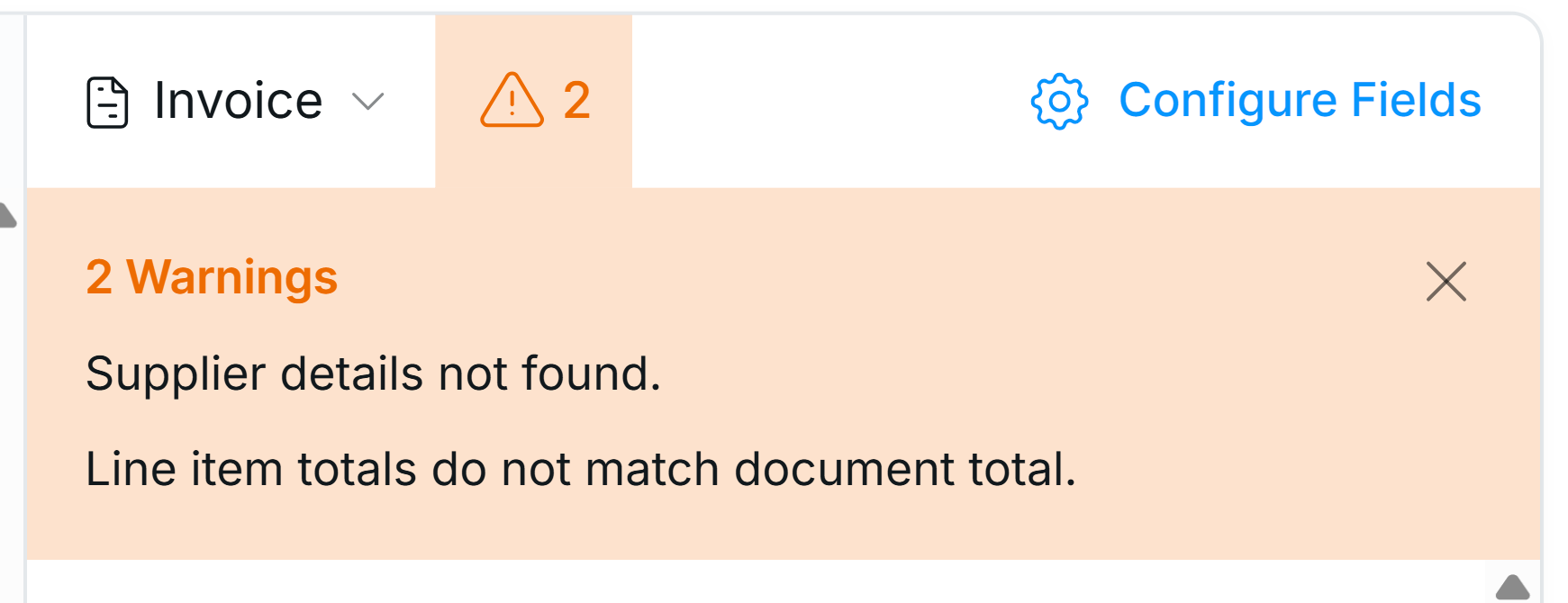
- Validation logic is already built and they do not want to move this across into Affinda Extract
- Have a high amount of reference data needed for validation
- They prefer not to build their own correction interface
Updating results in Affinda
The two most common ways to send failed validation results created in your system are:- Field validation results: Add field-level warnings explaining why they have failed validation.
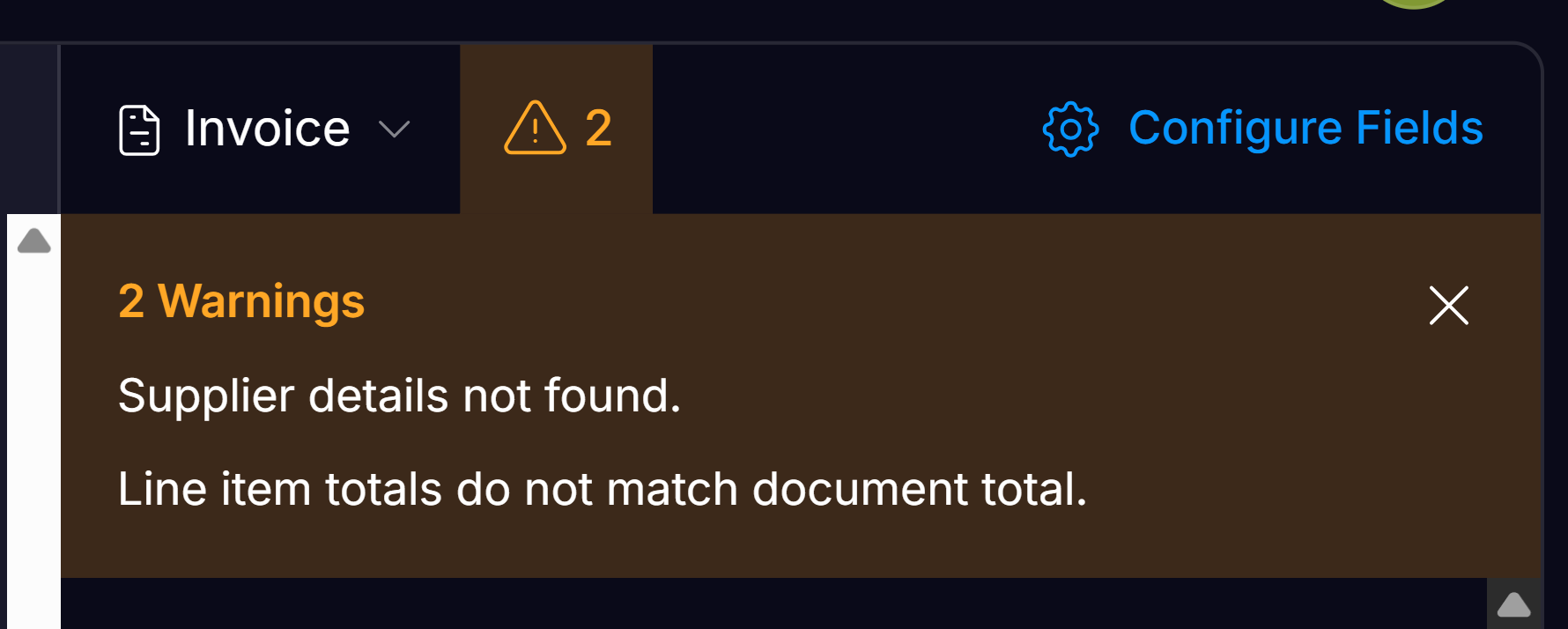
- Warnings: Add a document-level message explaining which fields need attention (see image below).
API integration
POST /documentwebhook: document.parse.completedGET /documentPATCH /document(addwarningMessages) orPOST /validation-results/batch-create-validation-results(see ‘Updating results in Affinda’ above)webhook: document.validate.completedGET /documentPATCH /document(isConfirmedset to true)
W6
Validation logic & exception handling in Affinda
W6
Validation logic & exception handling in Affinda
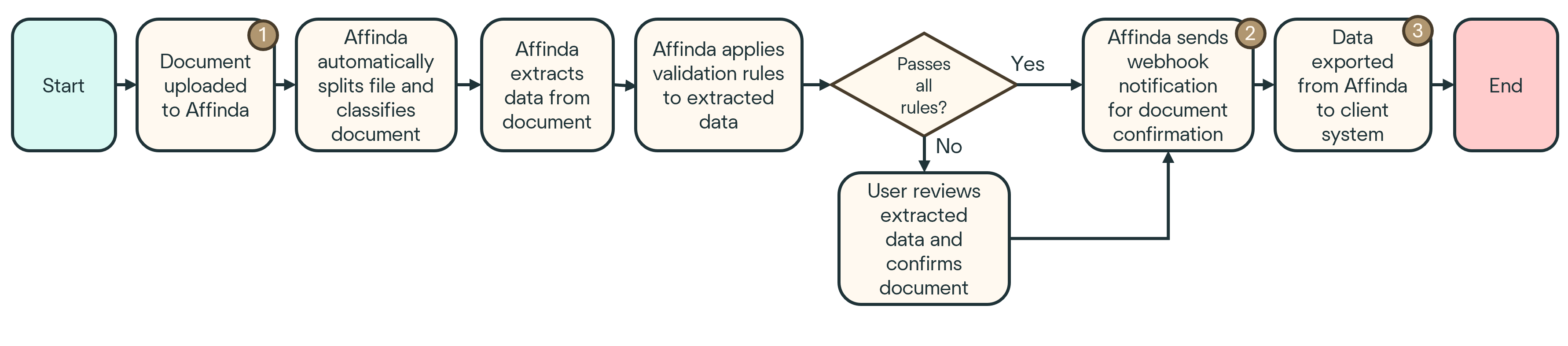
This fully automated workflow waits until a document is ‘confirmed’ within Affinda (either automatically or via user review), then triggers a webhook for your system to collect the final data.It requires no intervention or mid-process interaction from an integration perspective, making it ideal for high-volume pipelines.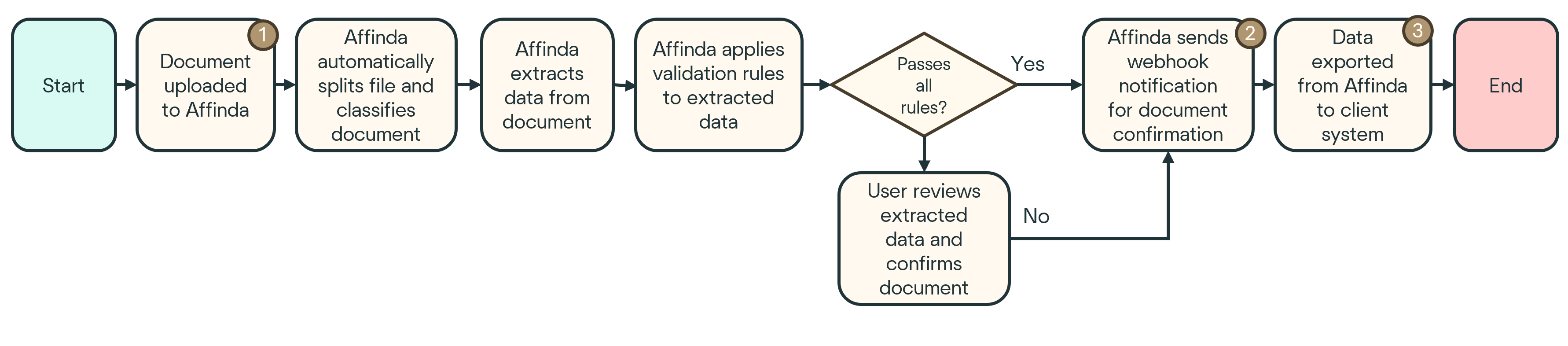
API integration
POST /documentwebhook: document.validate.completedGET /document
External reference data
Global data
Many teams will have a master list of data that they want to map the extracted data to - this is known as a Data Source in Affinda. This reference data can be added by uploading a flat-file via the platform, or by adding and updating via API. This global reference data is managed separately from the document upload and export flow, and the matching of raw data to reference data occurs within the document processing.Document specific data
Occasionally, teams will need to inject data per document. This may be needed where additional data specific to that document (but not present on the document itself) is needed for validation (e.g., the user submitting the file to the client system specifies the expected value of the document, and this is matched against the extracted data). In this case, customers should patch the data to the document as part of either W3 or W6.FAQs
Is data mapping required in all workflows?
Is data mapping required in all workflows?
Data mapping is independent of the chosen workflow. You’ll still need to align Affinda’s extracted field names and values to your internal data model (e.g. supplier lists or GL codes) regardless of how you manage validation or exceptions.
Do I need to rerun validation rules after patching a document?
Do I need to rerun validation rules after patching a document?
Yes, if you patch fields after parsing, you must explicitly trigger rule re-evaluation to get updated validation results. Skipping this step may cause documents to remain unconfirmed or reflect outdated logic.
Can I use multiple workflows in the same integration?
Can I use multiple workflows in the same integration?
Technically yes. Some systems route documents differently based on type, volume, or confidence thresholds. However, maintaining multiple flows increases complexity and should be considered only when the benefit clearly outweighs the overhead.